Req 3d — How Automation Works
Now that you can identify automation in the real world, let’s go deeper. How does automation actually work? And why do businesses, schools, and governments rely on it so heavily?
The Three Building Blocks of Automation
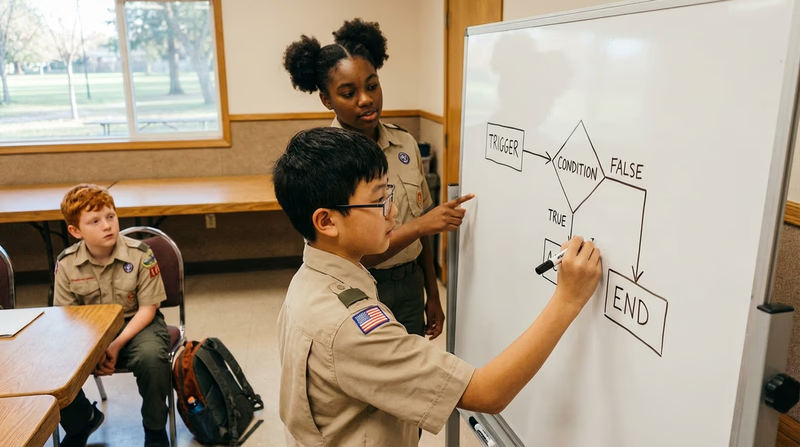
Every automated system — from a dishwasher to a factory robot — is built on three simple concepts:
1. Triggers
A trigger is the event that starts an automated process. Remember this term from Requirement 1? Here it is in action:
- A motion sensor detects someone approaching → the door opens
- The clock hits 6:30 AM → the coffeemaker starts
- A temperature sensor reads below 68°F → the heater turns on
- A new email arrives → an auto-reply is sent
Without a trigger, nothing happens. The trigger is the “if” in “if this, then that.”
2. Rules (Logic)
Once a trigger fires, the system follows a set of rules — pre-programmed instructions that tell it exactly what to do. These rules never change unless a human updates them.
- IF temperature < 68°F → TURN ON heater
- IF temperature ≥ 72°F → TURN OFF heater
- IF item scanned → LOOK UP price in database → ADD to total
This is fundamentally different from AI, which can figure out its own rules from data. Automation’s rules are written by people.
3. Actions
The action is the output — the thing that actually happens. A door opens. A sprinkler turns on. An email is sent. A robotic arm welds a seam. The action is the “then” in “if this, then that.”
How Automation Reduces Human Error
Humans are creative, adaptable, and great at solving new problems. But we are terrible at doing the same thing perfectly thousands of times in a row. We get tired. We get distracted. We make typos. Automation excels precisely where humans struggle.
Consistency
An automated system performs a task the same way every single time. A factory robot that tightens a bolt applies exactly 45 foot-pounds of torque on bolt #1, bolt #1,000, and bolt #1,000,000. A human worker’s grip strength would vary throughout the day.
Speed
Automated systems process information far faster than humans. A barcode scanner reads a product code in milliseconds. A payroll system calculates wages for 10,000 employees in seconds — a task that would take a human accountant weeks.
Accuracy in Repetitive Tasks
When a bank processes millions of transactions, it needs to add, subtract, and verify numbers accurately every time. A tiny error — even a misplaced decimal point — could cost millions of dollars. Automated systems do not get tired or make “fat finger” mistakes.
Error Detection
Automated systems can be programmed to catch errors that humans might miss. For example, if a data entry system notices that a zip code does not match a state, it can flag the entry for review. If a sensor on an assembly line detects a product outside of acceptable dimensions, it can automatically reject it.
How Automation Optimizes Resources
“Optimizing resources” means getting the most out of your time, money, energy, and materials. Automation is a master optimizer.
Time
By handling repetitive tasks, automation frees up humans to do creative, strategic, or interpersonal work that machines cannot do. A teacher who uses automatic grading for multiple-choice quizzes has more time to give personal feedback on essays.
Materials
Automated systems can measure and cut materials with precision, reducing waste. In manufacturing, a laser cutter controlled by a program wastes far less material than a human cutting by hand.
Energy
Smart building systems automate lighting and climate control based on occupancy. If no one is in a conference room, the lights turn off and the HVAC adjusts — saving electricity automatically.
Money
Every hour a human does not have to spend on a repetitive task is an hour they can spend on higher-value work. Businesses estimate that automation saves hundreds of billions of dollars globally each year by reducing errors and speeding up processes.
IFTTT — If This, Then That A free tool that lets you build simple automations connecting your apps and devices. Great for understanding triggers, rules, and actions.