Req 3d — Cataloging Your Collection
Without a catalog, your collection is just a pile of stuff you like. With one, it becomes an organized, searchable, insurable record of everything you own. A good catalog answers three questions instantly: What do I have? Where is it? What is it worth?
Why Catalog?
Cataloging is not busywork — it solves real problems:
- Insurance: If your collection is damaged or stolen, an itemized catalog with photos and values is essential for an insurance claim.
- Trading and selling: Knowing exactly what you have (and what condition it is in) makes every transaction smoother.
- Tracking gaps: A catalog reveals what is missing from a set or series, so you know what to look for next.
- Personal history: Years from now, you will want to remember when and where you acquired each piece.
Cataloging Methods
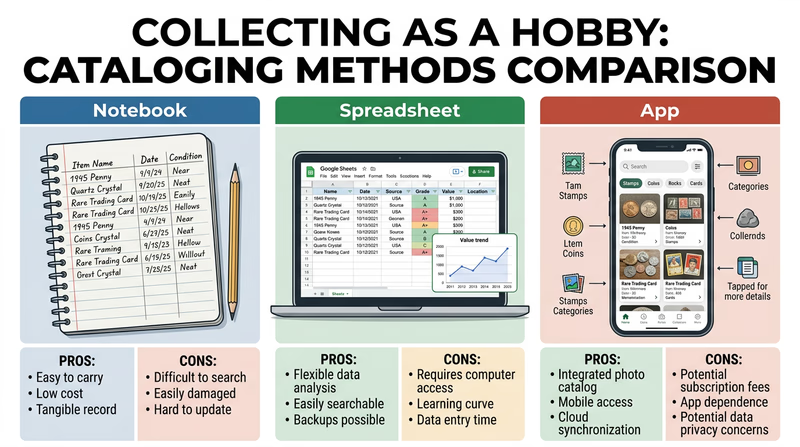
There is no single “right” way to catalog. The best method is the one you will actually use consistently.
Physical Notebook
A dedicated notebook or binder with one entry per item (or per page for groups of similar items). Simple, portable, and works even without electricity. The downside: searching through hundreds of entries gets slow, and updating is messy.
Spreadsheet
A spreadsheet (Google Sheets, Excel, or similar) gives you columns for every detail — name, date, source, condition, value, location, notes. You can sort, filter, and search instantly. This is the sweet spot for most collectors.
Dedicated Apps and Software
Many hobbies have specialized cataloging tools:
| Collection Type | Popular Cataloging Tools |
|---|---|
| Coins | PCGS CoinFacts, NGC Registry, Numista |
| Stamps | StampWorld, Colnect |
| Cards | Beckett, TCDB (Trading Card Database) |
| Rocks & minerals | Mindat.org, Rock Collector app |
| Comics | CLZ Comics, CovrPrice |
| General | Google Sheets, Airtable, Notion |
Photographic Catalog
Whatever other method you use, photographs are a must. Take clear, well-lit photos of both sides of each item (or all angles for 3D objects). Store them in folders that match your catalog’s organizational scheme. If your collection is ever stolen, photos are the most powerful evidence you can provide to police and insurers.
Building Your System
Start Simple
Do not over-engineer your catalog. Begin with the basics for each item and add detail as you go. A simple spreadsheet with 50 entries you actually maintain is more valuable than an elaborate database you abandoned after 10 entries.
Be Consistent
Pick a format and stick with it. If you abbreviate “Mint State” as “MS,” do it every time. If you record dates as “2024-03-15,” always use that format. Consistency makes searching and sorting reliable.
Update Regularly
Set a routine — maybe every time you acquire a new item, or once a month for a batch update. A catalog that is six months behind is not much help.
Cataloging Essentials
Every catalog entry should include
- Item identification: Full name, type, and any variant or edition details.
- Date acquired: When you obtained it.
- Source: Where it came from (store, show, gift, online).
- Condition: Condition grade or description.
- Value: Estimated current value and what you paid.
- Location: Where in your storage or display the item lives.
- Photo: At least one clear image linked or attached.