Req 9 — Online Crime and You
This requirement covers six topics about staying safe in the digital world:
- How to avoid being the victim of online crimes
- Common online financial scams
- Effective online security
- Identity theft and how to prevent it
- How criminals use social media to target victims
- How bullying, texting, and sharing photos can become crimes
How to Avoid Being the Victim of Online Crimes
The internet is an incredible tool, but it’s also a hunting ground for criminals who exploit trust, ignorance, and carelessness. The good news: most online crimes are preventable with awareness and smart habits.
Core Principles of Online Safety
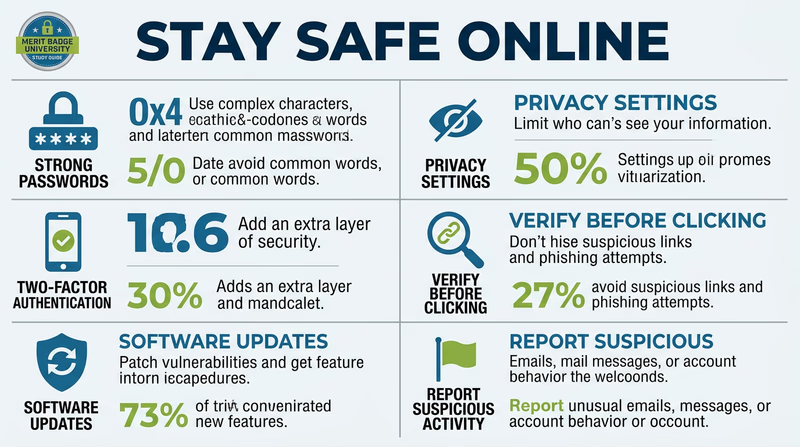
- Be skeptical — If something sounds too good to be true (free prizes, easy money, urgent requests from strangers), it almost certainly is
- Protect your information — Your full name, address, phone number, school name, and daily schedule are valuable to criminals
- Verify before you trust — Emails, messages, and websites can be faked to look like they come from trusted sources
- Think before you click — Malicious links in emails, texts, and social media messages are the most common way criminals gain access to your devices and accounts
- Keep software updated — Security updates patch vulnerabilities that criminals exploit
Common Online Financial Scams
Scammers are constantly inventing new tricks, but most schemes follow predictable patterns:
Phishing
Fake emails or messages that look like they’re from a legitimate company (your bank, Amazon, Netflix, a social media platform) asking you to “verify your account” or “update your payment information.” The link takes you to a fake website designed to steal your login credentials.
Advance Fee Fraud
You’re told you’ve won a prize, inherited money, or been selected for a special opportunity — but you need to pay a “processing fee” or “tax” first. Once you pay, the scammer disappears.
Online Shopping Scams
Fake websites or social media ads selling popular products at impossibly low prices. You pay, and either nothing arrives, or you receive a cheap counterfeit.
Tech Support Scams
A pop-up message or phone call claiming your computer has a virus. The “tech support” person asks for remote access to your computer or payment to fix the non-existent problem.
Romance Scams
A person builds a fake relationship online, then invents a crisis (medical emergency, legal trouble, travel problem) and asks for money. These scams increasingly target young people through social media and gaming platforms.
Effective Online Security
Think of online security like locking your doors — it won’t stop every determined criminal, but it eliminates most of the easy opportunities.
Password Security
- Use strong, unique passwords for every account — at least 12 characters mixing uppercase, lowercase, numbers, and symbols
- Never reuse passwords across sites — if one account is breached, all accounts with the same password become vulnerable
- Use a password manager (like Bitwarden, 1Password, or the one built into your browser) to generate and store complex passwords
- Never share your passwords with friends — even close friends
Two-Factor Authentication (2FA)
2FA adds a second verification step beyond your password — usually a code sent to your phone or generated by an app. Even if someone steals your password, they can’t access your account without the second factor. Enable 2FA on every account that offers it, especially:
- Email accounts
- Social media accounts
- Banking and financial accounts
- Gaming accounts
Safe Browsing
- Look for HTTPS (the padlock icon) in the address bar before entering any personal information
- Don’t click links in unsolicited emails or texts — type the URL directly into your browser instead
- Keep your browser, operating system, and apps updated
- Be cautious with public Wi-Fi — avoid logging into sensitive accounts on networks you don’t control
Online Security Checkup
Review these settings on your devices and accounts
- Two-factor authentication enabled on email, social media, and financial accounts
- Unique, strong password for every account (use a password manager)
- Software and apps updated to latest versions
- Privacy settings reviewed on all social media accounts
- Location sharing turned off or limited to trusted contacts
- Unfamiliar apps removed from your devices
Identity Theft and How to Prevent It
Identity theft occurs when someone uses your personal information — name, Social Security number, date of birth, account numbers — to commit fraud. It can take months or years to recover from, and it can happen to anyone, including minors.
How Thieves Get Your Information
- Data breaches — Hackers break into company databases and steal millions of records at once
- Phishing — Tricking you into voluntarily providing your information
- Mail theft — Stealing bank statements, tax documents, or pre-approved credit offers from mailboxes
- Dumpster diving — Going through trash for documents with personal information
- Social engineering — Manipulating people into revealing information through conversation
- Skimming — Devices placed on ATMs or card readers that capture your card data
How to Protect Yourself
- Guard your Social Security number — Don’t carry your card in your wallet, and never give it out unless absolutely necessary
- Shred sensitive documents before discarding them
- Monitor your accounts — Check bank and credit card statements regularly for unfamiliar charges
- Freeze your credit — A credit freeze prevents anyone from opening new accounts in your name (free for minors and adults)
- Be careful what you share online — Your birthday, pet’s name, mother’s maiden name, and school name are common security question answers that criminals can harvest from social media
How Criminals Use Social Media to Target Victims
Social media is a goldmine for criminals because people voluntarily share detailed personal information.
What Criminals Look For
- Your location — Check-ins, geotagged photos, and vacation posts tell criminals when you’re away from home
- Your routine — Regular posts about school schedules, practice times, and commute routes reveal predictable patterns
- Personal details — Birthday, school, pet names, favorite teams — all useful for guessing passwords or security questions
- Emotional vulnerability — People who post about loneliness, family conflict, or frustration are targets for manipulation
- Photos — Images can be used for catfishing (creating fake profiles), blackmail, or identifying valuable items in your home
How to Protect Yourself on Social Media
- Set profiles to private — only approved followers can see your content
- Don’t accept friend/follow requests from people you don’t know in real life
- Disable location services for social media apps
- Never post that you’re home alone or that your family is on vacation
- Think before posting: “Would I be comfortable if this appeared on the front page of my school newspaper?”
How Bullying, Texting, and Sharing Photos Can Become Crimes
Many young people don’t realize that activities they consider normal — texting, sharing photos, posting online — can cross the line into criminal behavior.
Cyberbullying
Cyberbullying becomes a crime when it involves:
- Harassment — Repeated, targeted messages intended to frighten or intimidate
- Threats — Any message threatening physical harm is a criminal offense
- Stalking — Obsessive monitoring, messaging, or following someone online
- Defamation — Knowingly spreading false, harmful statements about someone
Many states have specific cyberbullying laws, and victims can seek criminal charges and civil remedies.
Sexting and Photo Sharing
Sending, receiving, or possessing explicit images of anyone under 18 is a federal crime — even if the person in the photo sent it willingly, and even if the person possessing it is also under 18. This means:
- A teenager who takes and sends an explicit photo of themselves can be charged with production and distribution of child sexual abuse material
- A teenager who receives and keeps such a photo can be charged with possession of child sexual abuse material
- Forwarding such a photo to others multiplies the charges
These are serious felonies that can result in prison time and sex offender registration that follows a person for life.
Other Digital Crimes
- Doxxing — Publishing someone’s private information (address, phone number, school) online without their consent
- Swatting — Making a false emergency report to send armed police to someone’s home (a felony that has resulted in deaths)
- Unauthorized access — Logging into someone else’s account without permission, even if you know their password