Req 1c — Physical Safety
Cybersecurity is not only about protecting data — it is also about protecting your body. Hours spent staring at screens, hunched over keyboards, and scrolling on phones take a real physical toll. These injuries develop slowly, which makes them easy to ignore until they become serious.
Eye Strain and Digital Eye Fatigue
When you stare at a screen, you blink about 66% less than normal. Your eyes dry out. The muscles that focus your eyes get locked in one position. After a few hours, you might notice blurry vision, headaches, or a burning sensation. Doctors call this computer vision syndrome or digital eye strain, and it affects roughly 50% of regular computer users.
The 20-20-20 Rule
Every 20 minutes, look at something 20 feet away for at least 20 seconds. This relaxes the focusing muscles in your eyes and lets them reset. Set a timer on your phone if you tend to lose track of time while gaming or coding.
Repetitive Strain Injuries
Repetitive strain injuries (RSI) happen when you make the same small motion thousands of times — typing, clicking, swiping, or gripping a game controller. Common types include:
- Carpal tunnel syndrome — pain, tingling, or numbness in your wrist and hand from repetitive wrist motions
- Text neck — neck and upper back pain from looking down at a phone for long periods
- Smartphone pinky — soreness or a dent in your little finger from supporting the weight of your phone
- Trigger finger — stiffness or locking in a finger from repeated gripping or tapping
These injuries are not just for adults with desk jobs. Teenagers who game for hours, type long assignments, or scroll social media constantly are increasingly showing up with these conditions.
Ergonomic Setup
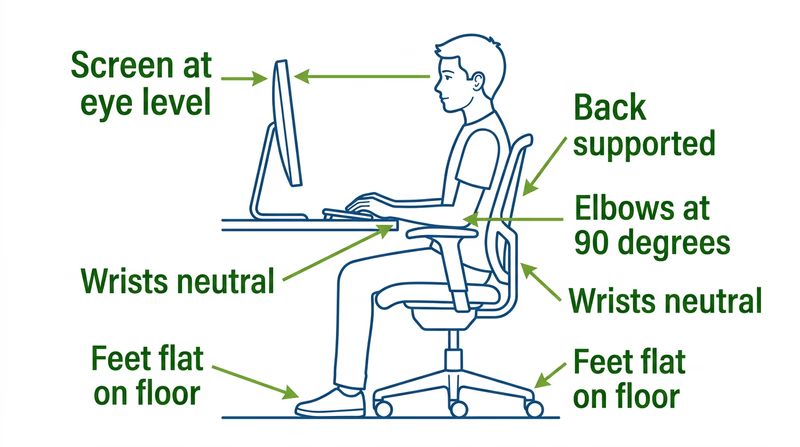
Workstation Ergonomics
Set up your desk to prevent injury
- Screen at eye level: The top of your monitor should be at or just below eye level so you look slightly downward.
- Arms at 90 degrees: Your elbows should form a right angle when typing, with your forearms parallel to the floor.
- Feet flat on the floor: If your chair is too high, use a footrest. Dangling feet put strain on your lower back.
- Wrists neutral: Your wrists should be straight, not bent up or down, while typing. A wrist rest can help.
- Take breaks: Stand up and move every 30–45 minutes. Stretch your fingers, wrists, neck, and shoulders.
Handling Electronics Safely
Electronic devices have their own physical hazards beyond ergonomic injuries:
- Heat — laptops can get hot enough to cause mild burns on your skin if used directly on your lap for long periods. Use a hard surface or a lap desk.
- Batteries — lithium-ion batteries in phones and laptops can swell, overheat, or (rarely) catch fire. Never use a device with a visibly swollen battery. Do not charge devices on soft surfaces like beds or couches that trap heat.
- Cables — frayed charging cables can cause electrical shocks or short circuits. Replace damaged cables immediately.
Mobile Device Safety While Moving
Every year, thousands of people are injured — and some are killed — because they were looking at their phone instead of watching where they were going. This is called distracted walking (or distracted cycling), and it is completely preventable.
- Never text or scroll while crossing a street. Stop walking, step to the side, finish your message, then continue.
- Do not use headphones at high volume while walking or biking. You need to hear traffic, cyclists, and other hazards around you.
- Never use a phone while riding a bike. Pull over completely if you need to check a message or map.
- Be aware in parking lots. Drivers backing out of spaces may not see a pedestrian who is looking down at a phone.