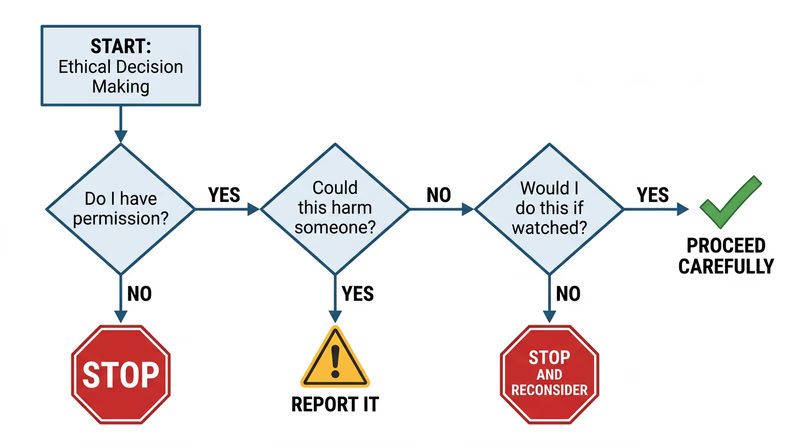
Req 2b — Ethical Behavior
You find an unlocked phone on a library table. The owner stepped away for a moment. You could scroll through their messages, peek at their photos, or post something from their account as a “joke.” Nobody would know. What do you do?
This is the core of cyber ethics — doing the right thing when technology makes the wrong thing easy and anonymous.
The Ethics Spectrum
Not every online action is clearly “right” or “wrong.” Some fall into gray areas that require real judgment. Here is a framework:
Clearly ethical:
- Reporting a phishing email to your email provider
- Logging out of a shared computer when you are done
- Telling a friend their account was hacked
Gray area:
- Using an ad blocker (saves you annoyance but reduces revenue for content creators)
- Reading someone’s public social media posts to learn about them
- Using free public Wi-Fi to check your email
Clearly unethical:
- Accessing someone else’s account without permission, even “as a joke”
- Downloading pirated software, music, or movies
- Sharing someone’s private photos or messages without consent
- Using someone else’s Wi-Fi without their permission
The Three Scenarios
The requirement specifically asks about three situations. Let’s examine each one.
Scenario 1: An Unattended or Unlocked Device
You sit down at a library computer and the previous user is still logged into their email. Or you find a phone on a park bench with no lock screen.
The key principle: access does not equal permission. Just because you can look at someone’s data does not mean you should.
Scenario 2: Seeing Someone’s Password
A classmate types their password in front of you and you catch it. Or you see a sticky note on a monitor with login credentials written on it.
- Do not use it. Even if you think it would be funny to change their wallpaper or send a joke message from their account.
- Do not share it. Telling other people someone’s password is a betrayal of trust, even if you did not steal it intentionally.
- Tell the person (privately and kindly) that their password is visible and suggest they change it. This is the helpful, trustworthy thing to do.
- For the sticky note: If it is in a workplace or school, you might also mention it to the person responsible for IT security.
Scenario 3: An Insecure Website
You discover that a website has a security flaw — maybe personal data is visible in the URL, or you can access pages you should not be able to reach.
- Do not explore the vulnerability. Do not try to access more data or test how far the flaw goes.
- Report it. Contact the website owner or organization. Many companies have a “responsible disclosure” or “bug bounty” program specifically for reporting security issues.
- Document what you saw (screenshot the URL or error, not the exposed data), so you can provide useful information in your report.
Why Good Judgment Matters
Technology changes fast, but ethics do not. You will encounter situations that no rule book covers. The Scout Law gives you a framework:
- Trustworthy: Do not betray someone’s trust just because technology makes it possible.
- Helpful: Use your skills to protect people, not exploit them.
- Brave: Report problems even when it is easier to stay quiet.