Req 4b — Malware
Malware — short for “malicious software” — is any software designed to damage, disrupt, or gain unauthorized access to computer systems. It is the weapon of choice for most cyberattacks. Understanding how malware works is like learning how a burglar thinks — it helps you lock the right doors.
The Malware Family
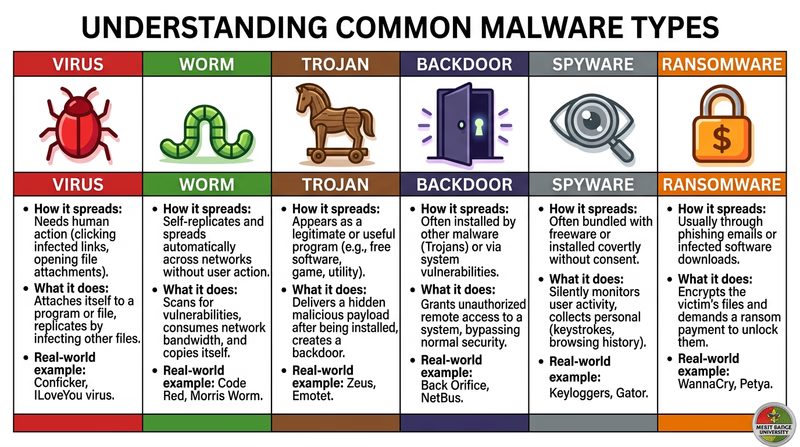
Before you pick one to research in depth, here is an overview of the major types. Each works differently and causes different kinds of harm.
Virus
A virus attaches itself to a legitimate program or file and spreads when that file is shared or executed. Just like a biological virus, it needs a “host” to travel. You might get one by downloading a file from an untrustworthy source or opening an infected email attachment. Viruses can corrupt files, slow down your computer, or delete data entirely.
Worm
A worm is like a virus that does not need a host. It spreads on its own across networks, replicating itself from computer to computer without any human action. The Morris Worm mentioned in the Introduction was one of the first — it crashed 10% of the internet in 1988.
Trojan
Named after the Trojan Horse from Greek mythology, a Trojan disguises itself as legitimate software. You think you are downloading a free game, a useful utility, or a media player — but hidden inside is malware. Unlike viruses and worms, Trojans do not replicate themselves. They rely on tricking you into installing them.
Backdoor
A backdoor creates a hidden entry point into a system, allowing an attacker to bypass normal authentication. Some backdoors are planted by hackers after an initial break-in; others are accidentally left in software during development. Once a backdoor is in place, an attacker can come and go as they please.
Spyware
Spyware secretly monitors your activity — keystrokes (called a keylogger), websites visited, files opened, and even screenshots. It sends this information back to the attacker. Spyware is often bundled with free software or arrives through phishing attacks. You may never know it is there.
Ransomware
Ransomware encrypts your files — photos, documents, everything — and demands payment (usually in cryptocurrency) for the decryption key. If you do not pay, your files stay locked forever. If you do pay, there is no guarantee the attacker will actually unlock them. Ransomware has become one of the most profitable forms of cybercrime.
How to Research Your Chosen Type
The requirement says to pick one and find out how it works. Here is a framework for your research:
Malware Research Framework
Answer these questions about your chosen type
- How does it get onto a computer? (infection method)
- Does it spread to other computers? If so, how?
- What does it do once installed? (payload)
- How does it hide from the user or antivirus software?
- What harm can it cause? (data loss, financial damage, privacy violation, system damage)
- What are one or two real-world examples of this malware in action?
- How can you protect yourself against it?
Protecting Yourself
Regardless of which type you research, the defenses against malware are surprisingly consistent:
- Keep software updated — many malware exploits target known vulnerabilities that patches have already fixed (you will cover this in Req 5b)
- Do not download from untrustworthy sources — stick to official app stores and verified websites
- Do not click suspicious links — in emails, texts, or chat messages (covered in Req 4d)
- Use antivirus software — and keep it updated (covered in Req 5c)
- Back up your data — if ransomware strikes, a recent backup means you do not need to pay