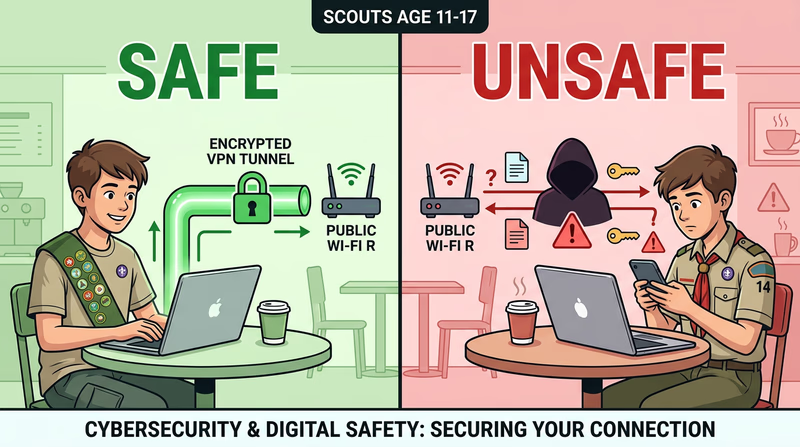
Req 4c — Public Wi-Fi Risks
You walk into a coffee shop, a library, or an airport and connect to the free Wi-Fi without a second thought. Millions of people do this every day. But that open network — the one that does not even require a password — is one of the easiest places for an attacker to steal your information. Here is why.
Why Public Wi-Fi Is Risky
Home Wi-Fi networks typically use encryption (like WPA2 or WPA3) and a password that only your family knows. Public Wi-Fi often has no encryption at all, or uses a shared password that everyone in the building knows. This means the data you send and receive can potentially be seen by anyone else on the same network.
Two major risks stand out:
Risk 1: Man-in-the-Middle Attacks
In a man-in-the-middle (MITM) attack, an attacker positions themselves between you and the Wi-Fi router. Instead of your data going directly to the internet, it passes through the attacker’s device first. They can see everything you send — passwords, messages, credit card numbers — and even modify data in transit.
How it works: the attacker uses freely available software to intercept network traffic on the same Wi-Fi network. If you visit a website that is not encrypted (HTTP instead of HTTPS), the attacker can read everything on the page, including anything you type into forms.
Risk 2: Evil Twin Networks
An evil twin is a fake Wi-Fi network set up by an attacker to look like a legitimate one. You think you are connecting to “CoffeeShop_WiFi” but you are actually connecting to the attacker’s hotspot — a device sitting in their backpack. All your traffic flows through their equipment, and they can see everything.
Evil twins are surprisingly easy to create. An attacker can set up a fake hotspot with a smartphone or a small portable router. They name it something that looks official — “Airport_Free_WiFi” or “Library_Guest” — and wait for people to connect.
How to Stay Safe on Public Wi-Fi
You do not need to avoid public Wi-Fi entirely — but you need to use it carefully.
Public Wi-Fi Safety
Follow these rules whenever you connect to public networks
- Use a VPN: A Virtual Private Network encrypts all your traffic, making it unreadable even on an insecure network. This is the single most effective protection.
- Verify the network name: Ask a staff member for the exact network name. Do not connect to networks with generic names like “Free WiFi.”
- Use HTTPS only: Look for the padlock icon in your browser. Never enter passwords or payment info on HTTP sites.
- Avoid sensitive activities: Do not access banking, make purchases, or enter important passwords on public Wi-Fi without a VPN.
- Turn off auto-connect: Disable the setting that automatically connects to available networks. Connect manually and only to networks you trust.
- Forget the network: After you disconnect, tell your device to forget the network so it does not reconnect automatically later.