Req 5a — Defense Technologies
You have spent the last several requirements learning how attackers operate. Now it is time to switch sides and learn about the tools defenders use. Every technology described here exists as a direct response to the threats you studied — firewalls block unauthorized traffic, antivirus catches malware, and VPNs encrypt your connection on risky networks.
Firewalls
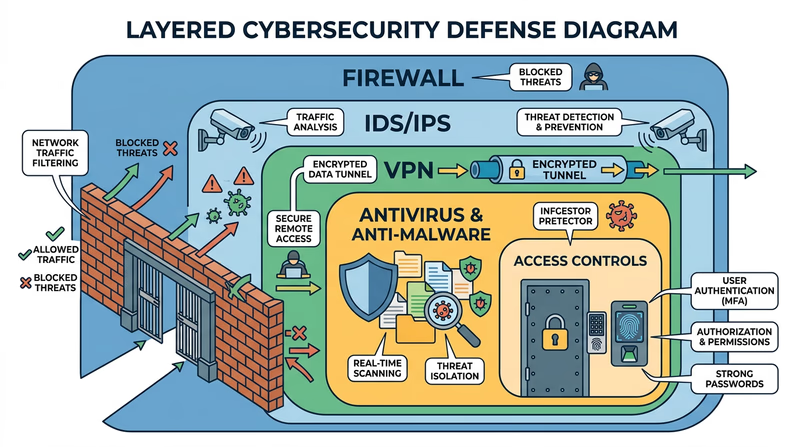
A firewall is a barrier between your computer (or network) and the outside world. It inspects incoming and outgoing network traffic and decides what to allow and what to block based on a set of rules.
Think of a firewall as a bouncer at a door. The bouncer has a list of who is allowed in and who is not. Legitimate traffic gets through; suspicious traffic gets turned away.
How it works:
- Examines each data packet (a small chunk of network traffic) for its source, destination, and type
- Compares the packet against its rules — is this traffic expected? Is it from a trusted source? Is it going to an allowed destination?
- Blocks or allows the packet accordingly
- Logs suspicious activity for review
Types of firewalls:
- Software firewalls run on your computer (Windows Firewall, macOS Firewall). They protect that individual device.
- Hardware firewalls are built into your router. They protect your entire home network.
- Cloud firewalls protect servers and online services.
Most home networks use both — your router’s built-in firewall plus the software firewall on each device.
Antivirus and Anti-Malware Software
Antivirus software scans your computer for known malware and removes it. Modern antivirus programs do much more than catch viruses — they detect worms, Trojans, spyware, ransomware, and other threats you learned about in Req 4b.
How it works:
- Signature-based detection — the software has a database of known malware “signatures” (unique code patterns). It scans files and compares them against this database.
- Heuristic analysis — instead of looking for exact matches, it analyzes program behavior. If a program tries to encrypt all your files or send data to an unknown server, the antivirus flags it as suspicious even if it is not in the database.
- Real-time protection — the software runs continuously, scanning files as you download, open, or execute them.
Intrusion Detection and Prevention Systems (IDS/IPS)
An Intrusion Detection System (IDS) monitors network traffic for signs of an attack and alerts administrators when it finds something suspicious. An Intrusion Prevention System (IPS) goes a step further — it detects the attack and automatically blocks it.
How they differ from firewalls:
- A firewall is like a locked door — it keeps unauthorized traffic out based on predefined rules.
- An IDS is like a security camera — it watches for suspicious behavior inside the network and raises an alarm.
- An IPS is like a security guard watching the camera who can tackle an intruder on the spot.
IDS/IPS systems look for patterns that indicate attacks — repeated failed login attempts, unusual data transfers, or network scanning. They are critical for organizations but less common in home networks.
Virtual Private Network (VPN)
A VPN creates an encrypted tunnel between your device and a remote server. All your internet traffic flows through this tunnel, hiding it from anyone trying to snoop — including your internet service provider, hackers on public Wi-Fi (as discussed in Req 4c), and even the Wi-Fi network operator.
How it works:
- Your device connects to a VPN server (run by the VPN provider)
- All your internet traffic is encrypted before leaving your device
- The VPN server decrypts your traffic and forwards it to its destination
- Responses come back to the VPN server, are encrypted, and sent back to you
When to use a VPN:
- On public Wi-Fi networks (coffee shops, airports, hotels)
- When you want to prevent your ISP from tracking your browsing
- When accessing sensitive information on untrusted networks
Access Controls
Access controls determine who can access what resources on a system. This includes:
- Authentication — proving who you are (passwords, biometrics, MFA)
- Authorization — defining what you are allowed to do once authenticated
- Accounting — tracking what you actually did (audit logs)
Access controls follow the principle of least privilege — every user should have the minimum access they need to do their job, and no more. Your school might give you access to Google Classroom but not the admin panel where teachers enter grades.
Choosing Your Three
Pick three of these technologies to discuss with your counselor. For each one, be ready to explain:
- What it does and how it works
- What threats it defends against
- Where you might encounter it in your own life