Req 6c — Crypto Hands-On
This is where cryptography stops being theory and becomes something you can touch. Pick one of the four options below — each one lets you work with real encryption tools and see how they function.
Option 1: Create Your Own Cipher
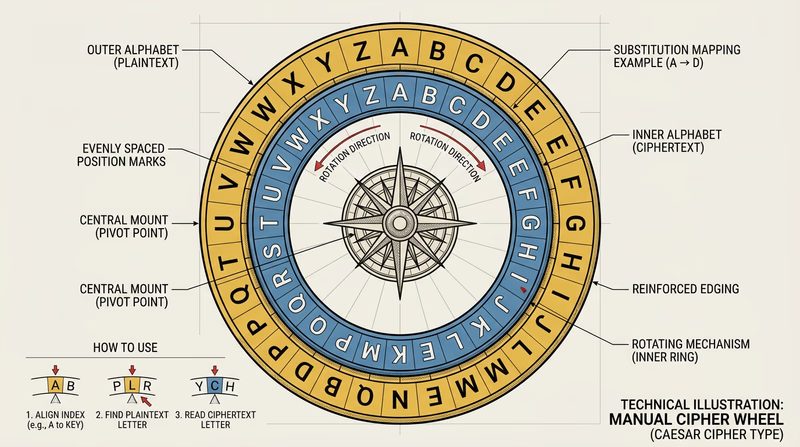
A substitution cipher replaces each letter with a different letter, number, or symbol. The simplest version is the Caesar cipher — shift every letter by a fixed number of positions. If you shift by 3, A becomes D, B becomes E, and so on.
To make your cipher more interesting, try:
- A random substitution where each letter maps to a random different letter (not just a shifted alphabet)
- A code book where entire words map to code words or numbers
- A Vigenère cipher that uses a keyword to shift each letter by a different amount
Strengths to discuss: Anyone without the key cannot easily read the message; the more random the substitution, the harder to crack.
Weaknesses to discuss: Simple substitution ciphers can be broken with frequency analysis — in English, the letter “E” appears most often, so the most common symbol in your encrypted message is probably “E.” Modern computers can crack these in seconds.
Option 2: End-to-End Encrypted Messaging
End-to-end encryption (E2EE) means that messages are encrypted on your device and can only be decrypted on the recipient’s device. Nobody in between — not the app company, not your internet provider, not a hacker — can read the message.
Apps with E2EE include Signal (widely considered the gold standard for secure messaging), WhatsApp, and iMessage (between Apple devices).
Why E2EE is more secure than SMS:
- SMS text messages are sent in plain text across cell towers — they can be intercepted
- Your carrier stores SMS messages on their servers
- SMS is vulnerable to SIM swapping attacks
- E2EE messages cannot be read even if the server is breached
For your counselor, install Signal or another E2EE app (with parental permission), send a test message, and explain how the encryption works behind the scenes.
Option 3: Hashing and Checksums
A hash is a fixed-size digital fingerprint of data. Feed any file — no matter how large — through a hashing algorithm, and it produces a unique string of characters. Change even a single character in the file, and the hash changes completely. This makes hashing perfect for verifying that data has not been tampered with.
How to create a hash:
- Windows: Open Command Prompt and type
certutil -hashfile filename SHA256 - macOS/Linux: Open Terminal and type
shasum -a 256 filename - Online: Use a tool like tools4noobs.com/online_tools/hash/
The demonstration:
- Create a text file with a message
- Generate the SHA-256 hash
- Have your counselor or a fellow Scout change one character in the file
- Generate the hash again
- Compare the two hashes — they will be completely different, even though only one character changed
Option 4: PGP Email Encryption
PGP (Pretty Good Privacy) uses public-key cryptography to encrypt emails. You create a key pair — a public key that anyone can use to encrypt messages to you, and a private key that only you have to decrypt those messages.
Steps:
- Install GPG software (Gpg4win for Windows, GPG Suite for macOS, or use the command line
gpgtool) - Generate your key pair
- Export your public key and share it with your counselor
- Import your counselor’s public key
- Encrypt a message using their public key and send it
- Decrypt a message they send you using your private key
This is the most advanced option and gives you direct experience with asymmetric encryption — the same concept that secures HTTPS connections and cryptocurrency transactions.
Encryption, Decryption, and Code Cracking — Khan Academy Interactive exercises on encryption techniques from basic ciphers to modern cryptography.