Extended Learning
A. Beyond the Badge
You have navigated digital safety, dissected how data is stored and compressed, explored networks and the internet, built real digital projects, wrestled with intellectual property law, and confronted the environmental impact of technology. That is a serious breadth of knowledge — and every bit of it will serve you as technology continues to evolve.
But earning the badge is a starting point, not a finish line. The digital world moves fast, and the Scouts who keep learning will be the ones shaping what comes next.
B. Building Your Own Computer
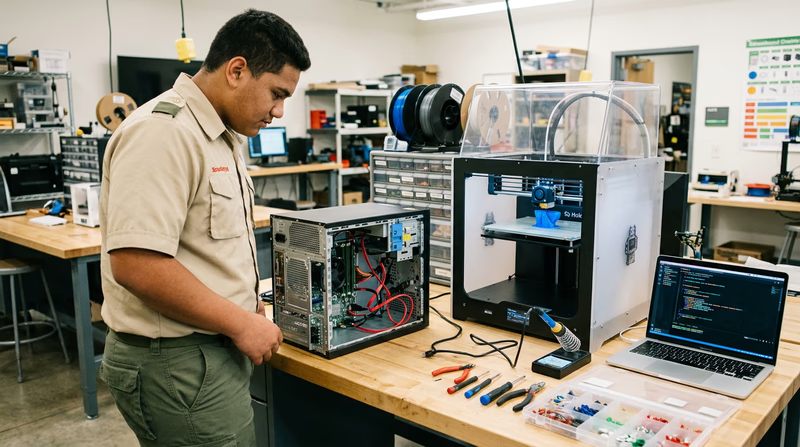
One of the most satisfying ways to deepen your understanding of digital technology is to build a computer from parts. When you assemble a PC yourself, the abstract concepts from this badge — CPU, RAM, storage, networking — become tangible objects you hold in your hands and connect together.
What You Will Learn
Building a computer teaches you how every component works together. You will select a motherboard (the main circuit board that connects everything), a CPU (which you studied in Req 4a), RAM modules, a storage drive (SSD or NVMe), a power supply (PSU), and a case to hold it all. If you want to play games, you will also choose a graphics card (GPU).
Getting Started
You do not need a huge budget. A capable general-purpose computer can be built for $400–$600. Here is how to approach it:
- Research components using sites like PCPartPicker, which checks compatibility between parts and compares prices across retailers
- Watch build guides on YouTube — channels like Linus Tech Tips and JayzTwoCents have step-by-step tutorials for first-time builders
- Ground yourself before handling components to avoid static electricity damage (an anti-static wrist strap costs a few dollars)
- Take your time — a first build typically takes 2–4 hours, and that is perfectly fine
- Install the operating system — consider trying Linux (free) alongside or instead of Windows
The satisfaction of pressing the power button and watching a computer you built boot up for the first time is hard to beat. And once you understand the hardware, troubleshooting problems and upgrading components becomes second nature.
PCPartPicker — Build Guides Curated PC build guides at every budget level with compatibility checking, price comparison, and community reviews.C. Learning to Code
If the Digital Technology badge sparked your interest in software, learning to program is the single most powerful next step you can take. Programming is the skill that turns you from a technology user into a technology creator.
Where to Start
The best first language depends on what you want to build:
- Python — The most popular first language. Clean, readable syntax. Used for web development, data science, AI, automation, and scripting. Free to install and thousands of tutorials available.
- JavaScript — The language of the web. Every website you visit uses JavaScript. Learning it lets you build interactive websites, browser extensions, and web apps.
- Scratch — A visual, block-based language from MIT designed for beginners. Great if you are under 13 or have never programmed before. You drag and snap code blocks together instead of typing syntax.
Free Resources
- freeCodeCamp (freecodecamp.org) — A complete web development curriculum with interactive exercises and certifications, entirely free
- The Odin Project (theodinproject.com) — A full-stack web development curriculum with real-world projects
- CS50 by Harvard (cs50.harvard.edu) — Harvard’s famous introduction to computer science, available free online with video lectures, problem sets, and a supportive community
- Codecademy (codecademy.com) — Interactive coding lessons in multiple languages with a free tier
From Hobby to Impact
Programming is not just a career skill — it is a superpower for Scouting. You could:
- Build a website for your troop (extending what you started in Req 6h)
- Create a campout planning app that calculates gear lists and meal plans
- Automate merit badge tracking with a custom spreadsheet script
- Program a Raspberry Pi weather station for your campsite
- Develop a nature identification app using machine learning
D. Cybersecurity Challenges and CTFs
If the malware and security topics in Req 4c and Req 5c caught your attention, Capture the Flag (CTF) competitions are the perfect next step. CTFs are cybersecurity challenges where participants solve puzzles involving cryptography, web security, reverse engineering, and forensics.
What CTFs Teach You
CTF challenges are designed to be educational. Each one teaches a specific security concept:
- Cryptography challenges — decode encrypted messages using classical and modern techniques
- Web exploitation — find and exploit vulnerabilities in intentionally insecure websites
- Forensics — analyze disk images, network traffic captures, and file metadata to find hidden information
- Reverse engineering — figure out how a program works without seeing its source code
Getting Started with CTFs
- picoCTF (picoctf.org) — Designed specifically for middle and high school students by Carnegie Mellon University. Problems range from beginner to advanced, with hints and learning resources built in.
- OverTheWire Bandit (overthewire.org/wargames/bandit/) — A series of challenges that teach Linux command-line skills and basic security concepts in a progressive difficulty curve.
- CyberStart (cyberstart.com) — A gamified platform used by many Scout councils and school programs to introduce cybersecurity.
These are not just games — colleges and employers recognize CTF experience as evidence of genuine cybersecurity skills. Top CTF competitors are regularly recruited for internships and jobs.
picoCTF — Cybersecurity for Students Carnegie Mellon University's free cybersecurity competition designed for middle and high school students — hundreds of challenges at all skill levels.E. Real-World Experiences
Visit a Data Center
Data centers are the physical backbone of the internet — massive buildings filled with thousands of servers, cooling systems, backup generators, and miles of fiber-optic cable. Some cloud providers and colocation facilities offer tours. Seeing rows of blinking servers in person makes the concept of “the cloud” much more concrete.
Attend a Hackathon
Hackathons are events where teams build a software project from scratch in 24–48 hours. Many hackathons welcome high school students and provide mentors, food, and sometimes prizes. They are intense, collaborative, and incredibly educational — you will learn more in one weekend than in weeks of solo study.
Join a Maker Space
Maker spaces and fab labs provide access to 3D printers, laser cutters, CNC machines, electronics workbenches, and sometimes high-end computers. Many offer youth memberships and classes. Check your local library system — many now have maker spaces built in.
Volunteer for a Tech Nonprofit
Organizations like PCs for People, Kramden Institute, and World Computer Exchange refurbish donated computers and distribute them to people who cannot afford technology. Volunteering teaches you hardware repair skills while making a tangible difference in your community.
Shadow a Tech Professional
Ask your counselor, parents, or school career counselor to help arrange a job shadow with a software developer, network administrator, or IT professional. Spending a day watching someone work in tech is one of the best ways to decide if a tech career interests you.
F. Organizations
CompTIA
The Computing Technology Industry Association offers certifications, career resources, and educational programs for people entering the IT field. Their IT Fundamentals (ITF+) certification is designed for beginners and validates basic IT knowledge.
CompTIA — IT Career Resources Career roadmaps, certification guides, and free resources for anyone exploring a career in information technology.Electronic Frontier Foundation (EFF)
A nonprofit defending digital privacy, free speech, and innovation. EFF fights for your rights in the digital world — from encryption to fair use to government surveillance. Understanding their work gives you a deeper perspective on the policy side of technology.
Electronic Frontier Foundation The leading nonprofit defending civil liberties in the digital world — covering privacy, free expression, and technology policy.Code.org
A nonprofit dedicated to expanding access to computer science education, especially for underrepresented groups. They provide free curricula, the Hour of Code initiative, and advocacy for computer science in schools.
Code.org Free computer science courses for students of all ages, from visual block programming to AP Computer Science — used by tens of millions of students worldwide.Internet Society (ISOC)
A global nonprofit focused on the open development, evolution, and use of the internet. They work on internet governance, security, and access issues — helping ensure the internet remains a shared global resource.
Internet Society A global organization promoting the open development and use of the internet — with educational resources, chapters worldwide, and youth engagement programs.Khan Academy — Computing
Khan Academy’s computing courses cover everything from basic internet literacy to advanced algorithms and cryptography, all for free. Their interactive format lets you learn at your own pace with immediate feedback.
Khan Academy — Computing Free, comprehensive computing courses covering internet basics, programming, algorithms, and cybersecurity — learn at your own pace with interactive exercises.