Req 3a — Digitizing Text, Sound & Images
Everything on your phone — every song, every photo, every text message — is stored as nothing more than long strings of ones and zeros. It seems impossible that two simple digits could capture the richness of a symphony or the detail of a photograph, but that is exactly what digitization does. Understanding how it works is one of the most fundamental concepts in all of computing.
What Is Digitization?
Digitization is the process of converting information from the real world (analog) into digital form (binary numbers). The word “digital” comes from “digit” — a number. At its core, every piece of digital data is represented using the binary number system, which uses only two digits: 0 and 1. Each 0 or 1 is called a bit (short for “binary digit”). Eight bits grouped together form a byte.
How Text Is Digitized
Computers store text by assigning a unique number to every character. The earliest system, called ASCII (American Standard Code for Information Interchange), uses 7 bits to represent 128 characters — the English alphabet (uppercase and lowercase), numbers 0–9, punctuation marks, and special control characters.
For example:
- The letter A = 65 in decimal =
01000001in binary - The letter a = 97 in decimal =
01100001in binary - The digit 0 = 48 in decimal =
00110000in binary
ASCII worked fine for English, but it could not represent characters from other languages. Unicode expanded the system to handle over 149,000 characters from virtually every writing system on Earth — including Chinese, Arabic, Hindi, emoji, and even ancient Egyptian hieroglyphics.
How Sound Is Digitized
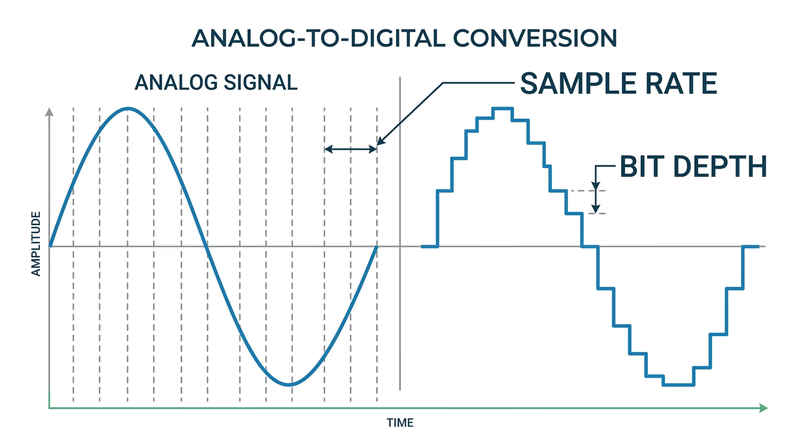
Sound in the real world is a continuous wave — air molecules vibrating at different frequencies and amplitudes. To digitize sound, a computer takes thousands of samples of the sound wave every second, measuring its amplitude at each point. This process is called sampling.
The two key factors in digital audio quality are:
- Sample rate — how many times per second the sound wave is measured. CD-quality audio uses 44,100 samples per second (44.1 kHz). Each sample captures a snapshot of the wave’s position at that instant.
- Bit depth — how many bits are used to describe each sample’s amplitude. CD audio uses 16 bits per sample, which means each measurement can be one of 65,536 possible values. Higher bit depth means more precise measurements.
Think of it like a flipbook: each page shows a single frame, and when you flip through them fast enough, you see smooth motion. Audio sampling works the same way — enough snapshots played back fast enough sound like continuous music.
How Images Are Digitized
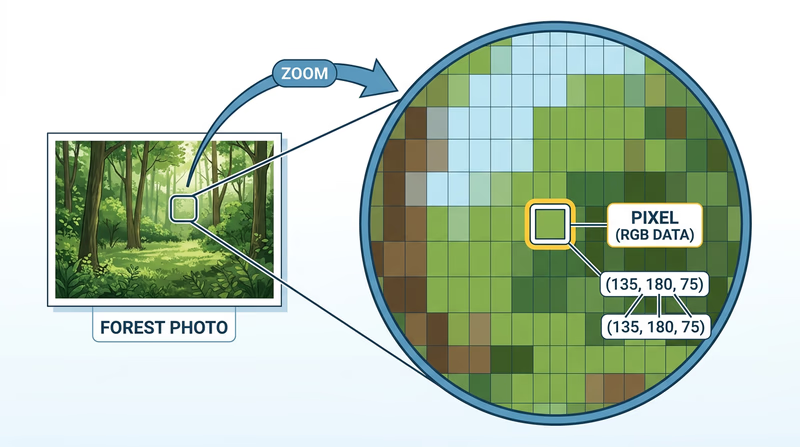
A digital image is made of tiny dots called pixels (short for “picture elements”). Each pixel stores color information as numbers. The more pixels in an image, the more detail it can show — this is why camera specs mention megapixels (millions of pixels).
For color images, each pixel’s color is typically described using three values: the amount of red, green, and blue (RGB) light. Each color channel usually uses 8 bits (values from 0 to 255), giving a total of 24 bits per pixel and 16.7 million possible colors.
For example:
- Pure red = R:255, G:0, B:0
- Pure white = R:255, G:255, B:255
- Pure black = R:0, G:0, B:0
- Scout green = approximately R:0, G:100, B:0
Putting It All Together
| Data Type | How It Is Digitized | Key Units |
|---|---|---|
| Text | Each character assigned a binary number (ASCII/Unicode) | Bits per character (7 for ASCII, up to 32 for Unicode) |
| Sound | Continuous wave sampled thousands of times per second | Sample rate (Hz) and bit depth |
| Images | Grid of pixels, each with RGB color values | Resolution (megapixels) and color depth (bits per pixel) |
The key idea across all three: digitization converts continuous real-world information into discrete numbers that computers can store, process, and transmit. Some detail is always lost in this conversion — a digital photo is not the actual scene, and a digital recording is not the actual performance — but with enough samples, bits, and pixels, the digital version is virtually indistinguishable from the original.
Code.org — How Computers Work: Binary & Data A playlist of short, engaging videos explaining binary, data representation, and how computers process information.Now that you know how data gets into a computer, the next question is: how do you make all that data smaller so it does not fill up your storage? That is where compression comes in.