Req 3b — Lossy vs. Lossless Compression
A single three-minute song stored as raw digital audio takes up about 30 megabytes. An uncompressed photo from a modern camera can be 50 megabytes or more. If we stored everything at full size, your phone would run out of space after a handful of photos and songs. Data compression solves this problem by making files smaller — and there are two fundamentally different ways to do it.
Lossless Compression: Nothing Lost
Lossless compression reduces file size without losing any data at all. When you decompress (unpack) the file, you get back the exact original — bit for bit, byte for byte.
How is this possible? Lossless compression works by finding patterns and redundancy in the data and representing them more efficiently.
Imagine you have the text: AAAAAABBBCCCCCCCCDD. Instead of storing every letter, you could write: 6A3B8C2D — same information, fewer characters. This technique is called run-length encoding, and it is one of the simplest forms of lossless compression.
Real lossless algorithms like ZIP, PNG, and FLAC use more sophisticated pattern-matching, but the principle is the same: find repeated patterns and store them using shorthand.
When to Use Lossless
Lossless compression is essential when every bit of data matters:
- Documents and spreadsheets (ZIP, GZIP) — changing even one character in a contract or formula could cause problems
- Software and programs (ZIP) — a single corrupted bit in code can crash an application
- Medical images (PNG) — doctors need every detail to make accurate diagnoses
- Audio production (FLAC, ALAC) — recording studios need perfect copies for editing and mixing
Lossy Compression: Good Enough Is Good Enough
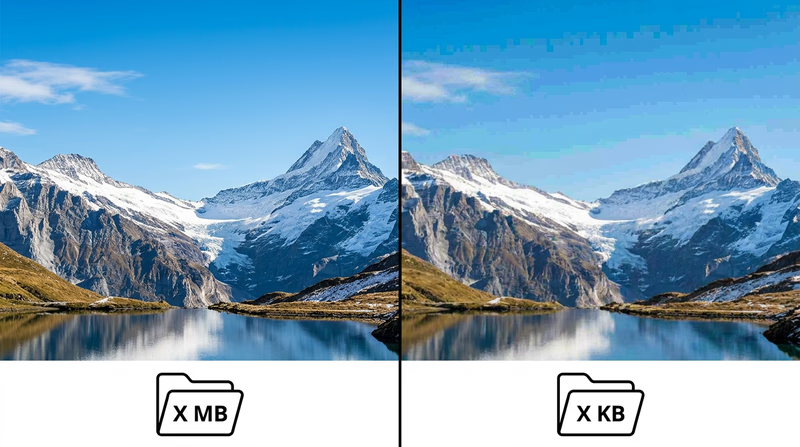
Lossy compression achieves much higher compression ratios by permanently discarding some data — the parts that are least noticeable to human senses. Once the data is thrown away, it is gone forever. You cannot decompress a lossy file back to the exact original.
This sounds alarming, but it works because human perception has limits:
- Audio: Your ears cannot hear frequencies above ~20,000 Hz or very quiet sounds masked by louder ones. MP3 and AAC formats remove these inaudible sounds, shrinking an audio file to about one-tenth its original size with minimal perceptible quality loss.
- Images: Your eyes are more sensitive to changes in brightness than changes in color. JPEG compression takes advantage of this, reducing color detail more aggressively than brightness detail. A JPEG photo might be 10–20 times smaller than the raw original.
- Video: Most frames in a video are very similar to the frames before and after them. Formats like MP4/H.264 store only what changes between frames, dramatically reducing file size.
When to Use Lossy
Lossy compression is the right choice when perfect accuracy is not critical and small size matters:
- Music for listening (MP3, AAC) — streaming services use lossy compression to deliver millions of songs without enormous bandwidth
- Photos for sharing (JPEG) — social media posts, websites, and messaging apps
- Streaming video (MP4, H.264, H.265) — Netflix, YouTube, and video calls would be impossible without lossy video compression
- Voice calls (various codecs) — phone calls compress voice data aggressively since speech does not need CD-quality audio
Side by Side
| Feature | Lossless | Lossy |
|---|---|---|
| Data preserved? | 100% — original perfectly recoverable | Some data permanently removed |
| Compression ratio | Moderate (2:1 to 3:1 typical) | High (10:1 to 50:1 or more) |
| File size | Larger | Much smaller |
| Best for | Documents, code, archival, medical | Streaming, sharing, everyday media |
| Common formats | ZIP, PNG, FLAC, GZIP | JPEG, MP3, AAC, MP4, H.264 |
A Real-World Analogy
Think of lossless compression like packing a suitcase efficiently — you fold clothes tightly and use every inch of space, but everything you packed is still there when you arrive. Lossy compression is like deciding to leave some items at home — you travel lighter, and you might not even miss what you left behind, but you cannot get those items back until you return home.
Khan Academy — Data Compression An interactive lesson from Khan Academy explaining lossless and lossy compression with hands-on examples.You now understand how data is both stored and compressed. Next, let’s look at the devices that process all this data — and how programming makes them useful.