Req 3e — Computer Networks
When you send a text to a friend across town or share a file with your patrol over Wi-Fi, you are using a computer network. Networks are the invisible highways that let devices share data, resources, and communication — and understanding how they work is fundamental to understanding the digital world.
What Is a Computer Network?
A computer network is two or more devices connected together so they can share data and resources. That is the simplest definition, and it covers everything from two laptops connected by a single cable to the billions of devices linked through the internet.
Networks need three things to function:
- Devices (also called nodes or hosts) — computers, phones, printers, servers, or any hardware that sends or receives data
- A connection medium — the physical or wireless link between devices (Ethernet cables, Wi-Fi radio waves, fiber-optic cables)
- Protocols — shared rules that govern how data is packaged, addressed, sent, and received (the most common set is TCP/IP, which is the foundation of the internet)
LAN: Local Area Network
A Local Area Network (LAN) connects devices in a small, defined area — your home, a classroom, a Scout meeting hall, or a single building.
Characteristics of a LAN:
- Coverage: Small area — typically a single building or campus
- Ownership: Usually owned and managed by one person or organization (your family manages your home Wi-Fi; your school manages its network)
- Speed: Very fast — modern LANs typically run at 1 Gbps (gigabit per second) or higher over Ethernet, and 100+ Mbps over Wi-Fi
- Connection methods: Ethernet cables (wired) and Wi-Fi (wireless)
- Common equipment: Router, switch, access point
Everyday LAN examples:
- Your home Wi-Fi network connecting your phone, laptop, smart TV, and printer
- A school computer lab where all the desktops share one printer and internet connection
- A Scout camp office with a few computers networked together
WAN: Wide Area Network
A Wide Area Network (WAN) connects devices or networks across large geographic areas — cities, states, countries, or the entire globe. The internet itself is the largest WAN ever built.
Characteristics of a WAN:
- Coverage: Large area — city-wide, nationwide, or worldwide
- Ownership: Usually operated by telecommunications companies (ISPs like Comcast, AT&T, Verizon) or large organizations. No single entity owns the entire internet.
- Speed: Varies widely — from a few Mbps in rural areas to 10+ Gbps on fiber backbone connections
- Connection methods: Fiber-optic cables (including undersea cables), satellite links, cellular towers, microwave relays
- Common equipment: Routers, modems, fiber-optic switches, cellular towers
Everyday WAN examples:
- The internet — connecting billions of devices worldwide
- A company with offices in New York, London, and Tokyo connected through a private WAN
- Cellular data networks that let you use your phone anywhere with coverage
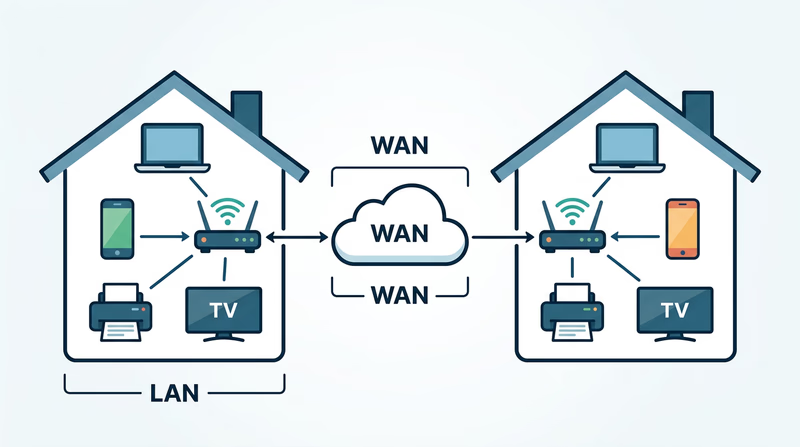
LAN vs. WAN at a Glance
| Feature | LAN | WAN |
|---|---|---|
| Area covered | Single building or campus | Cities, countries, worldwide |
| Owned by | Individual or single organization | Telecom providers or shared infrastructure |
| Speed | Very high (1–10 Gbps typical) | Varies (10 Mbps to 10 Gbps) |
| Cost | Low (your router costs ~$50–$200) | High (undersea cables cost hundreds of millions) |
| Example | Your home Wi-Fi | The internet |
| Latency | Very low (under 1 ms) | Higher (10–100+ ms depending on distance) |
How LANs and WANs Work Together
Here is what happens when you load a webpage:
- Your laptop sends a request over your home LAN (via Wi-Fi to your router)
- Your router forwards the request to your internet service provider through your WAN connection (cable, fiber, or DSL modem)
- The ISP routes the request through the internet backbone (the global WAN) — possibly across undersea fiber-optic cables
- The request reaches the web server (which is on its own LAN in a data center)
- The server sends the webpage back along the reverse path
This entire round trip typically takes less than a second — even when the server is on another continent.
Submarine Cable Map An interactive map showing every undersea internet cable in the world — zoom in to see the cables that connect continents and carry the internet's data.You have now covered all the fundamentals of digital data — how it is stored, compressed, processed, and transmitted. Time to move into the world of software and learn how the programs running on your devices actually work.