Req 4a — Programs, Apps & How They Run
When you tap an app icon on your phone, a chain of events fires off in milliseconds: the processor loads instructions from storage, shuffles data through memory, and paints results on your screen — billions of operations happening faster than you can blink. Understanding how this works gives you a deeper appreciation for every piece of software you use.
What Is a Program?
A program (also called software, application, or app) is a set of instructions that tells a computer what to do. Just as a recipe tells you the steps to make a meal, a program tells the CPU the steps to accomplish a task — whether that is displaying a webpage, sorting a spreadsheet, or rendering a video game frame.
Programs are written by humans in programming languages like Python, Java, JavaScript, C++, or Swift. These languages use words and symbols that humans can read and write. Before a program can run, it is usually translated into machine code — the binary ones and zeros that the CPU actually understands.
There are different levels of software:
- Operating System (OS): The master program that manages all hardware and provides a platform for other software to run. Examples: Windows, macOS, Android, iOS, Linux.
- Applications: Programs that perform specific tasks on top of the OS. Examples: web browsers, word processors, games, photo editors.
- Utilities: Smaller programs that help maintain the system. Examples: antivirus software, file managers, backup tools.
How the CPU Executes a Program
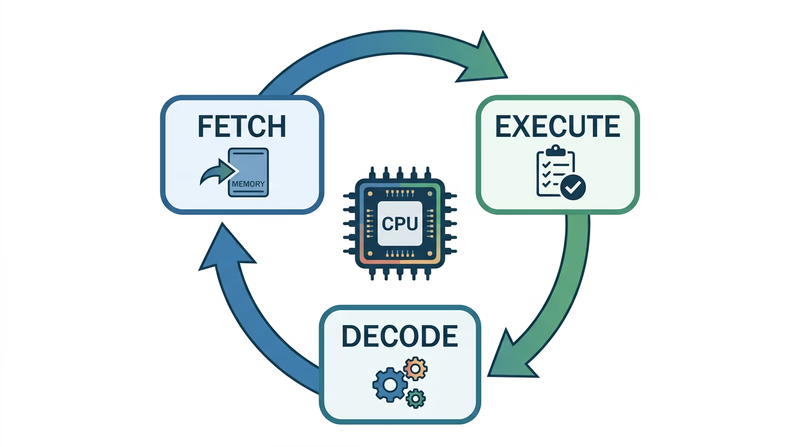
The CPU (Central Processing Unit) is the brain of the computer. It follows a simple but incredibly fast cycle called the fetch-decode-execute cycle:
- Fetch: The CPU grabs the next instruction from memory (RAM)
- Decode: The CPU figures out what the instruction means — is it “add two numbers”? “Load data from storage”? “Display a pixel on screen”?
- Execute: The CPU carries out the instruction
- Repeat: The CPU moves to the next instruction and starts again
Modern CPUs perform this cycle billions of times per second. The speed is measured in gigahertz (GHz) — a 3 GHz processor performs 3 billion cycles per second.
Most modern CPUs also have multiple cores — essentially multiple brains that can work on different instructions simultaneously. A quad-core processor can execute four instruction streams at once, which is why your computer can play music, download a file, and display a webpage all at the same time.
The Role of Memory (RAM)
RAM (Random Access Memory) is the computer’s short-term workspace — a fast, temporary storage area where the CPU keeps the data and instructions it needs right now.
Think of it this way:
- Storage (SSD/hard drive) is like a filing cabinet — it holds everything permanently but takes time to open and retrieve items
- RAM is like your desk — it holds the files you are currently working with, so you can access them instantly
- CPU is like your brain — it processes information from your desk (RAM), not directly from the filing cabinet (storage)
When you open an app, the operating system copies the program’s instructions and data from storage into RAM, where the CPU can access them quickly. The more RAM your device has, the more apps and data it can keep “on the desk” at once. When you close an app or shut down, the contents of RAM disappear — that is why it is called volatile memory.
The Loading Process Step by Step
Here is what happens when you tap an app icon:
- The OS receives your tap and identifies which app you want
- The OS finds the app’s program files on storage (SSD/flash memory)
- The program code is copied from storage into RAM
- The CPU begins reading instructions from RAM using the fetch-decode-execute cycle
- The app’s interface appears on screen as the CPU processes drawing instructions
- The app continues running — responding to your input, processing data, updating the display — until you close it
Cache: The Secret Speed Boost
Between RAM and the CPU, there is an even faster (but much smaller) memory called cache. The CPU keeps its most frequently used data in cache so it does not have to wait for RAM. Think of cache as a sticky note on your desk with the numbers you use most often — even faster to glance at than opening a folder.
Modern CPUs have multiple levels of cache (L1, L2, L3), each progressively larger but slightly slower. The fastest cache (L1) can deliver data to the CPU in about one nanosecond — one billionth of a second.
Code.org — How Computers Work: CPU & Memory A clear, visual explanation of how the CPU and memory work together to run programs, from the Code.org 'How Computers Work' series.You now know how programs work inside a computer. Next, think about the programs you use in your own life — and why they matter.