Req 4d — Barcodes, QR Codes & RFID
Pick up almost any product around you — a snack bar, a textbook, a water bottle — and you will find some form of machine-readable code on it. These codes are the silent workhorses of modern commerce, logistics, and information sharing. They let machines read data instantly without anyone typing a single character.
Barcodes
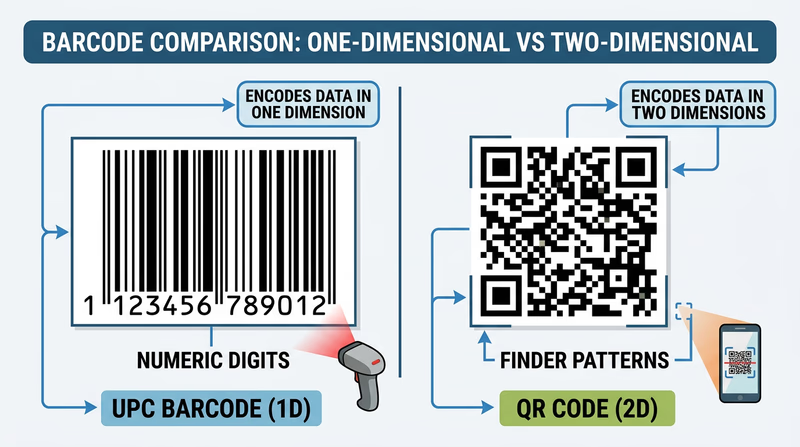
A barcode is a pattern of parallel lines (bars) and spaces of varying widths that represent data. A laser scanner or camera reads the pattern and converts it back into numbers. The most common type is the UPC (Universal Product Code), which you see on virtually every product sold in a store.
What Data Does a Barcode Contain?
A standard UPC barcode contains a 12-digit number. This number does not describe the product directly — it is a reference code that the store’s computer system looks up in a database to find the product name, price, and inventory information.
The 12 digits break down as:
- First digit: Product category (0 = standard grocery, 2 = weighted items like produce, 3 = health/beauty)
- Next 5 digits: Manufacturer identification number
- Next 5 digits: Specific product code (assigned by the manufacturer)
- Last digit: A check digit used to verify the barcode was scanned correctly
Examples of Barcode Use
- Retail stores: Every item scanned at checkout uses a barcode to look up its price and track inventory
- Libraries: Books have barcodes linking to the library’s catalog — scanning a book instantly checks it out or returns it
- Shipping and logistics: Packages have barcodes that track them through every sorting facility from origin to destination
- Hospital patient wristbands: Barcodes on wristbands link to patient records, ensuring the right medication goes to the right person
QR Codes
A QR code (Quick Response code) is a two-dimensional square pattern of black and white modules that stores data both horizontally and vertically. Unlike barcodes, which store data in only one direction, QR codes use both dimensions — allowing them to hold far more information.
What Data Does a QR Code Contain?
A QR code can store up to 7,089 numeric characters or 4,296 alphanumeric characters — enough for a full website URL, a paragraph of text, contact information, or Wi-Fi network credentials. The data is encoded directly in the pattern itself, so a QR code can function without any external database.
QR codes also include error correction — even if part of the code is damaged, dirty, or obscured, it can still be read. This is why some QR codes include logos in the center without breaking.
Examples of QR Code Use
- Restaurant menus: Scan a table-top QR code to load the menu on your phone (this became widespread during the COVID-19 pandemic)
- Payments: Mobile payment systems like Venmo, Cash App, and WeChat Pay use QR codes to transfer money instantly
- Event tickets: Concert and movie tickets often use QR codes instead of paper tickets — your phone screen is scanned at the door
- Product information: Scan a QR code on food packaging to see nutritional details, sourcing information, or recipe ideas
- Wi-Fi sharing: A QR code can store your network name and password, letting guests connect by scanning instead of typing
RFID Tags
RFID (Radio Frequency Identification) uses radio waves to wirelessly transmit data from a small tag to a reader. Unlike barcodes and QR codes, RFID does not require line of sight — the tag can be read through packaging, clothing, or even walls, depending on the frequency used.
An RFID system has two parts:
- Tag: A tiny chip connected to an antenna, embedded in a sticker, card, or plastic case. Tags can be passive (powered by the reader’s radio signal — no battery needed) or active (has its own battery and can transmit over longer distances).
- Reader: Sends radio waves and receives the tag’s response
What Data Does an RFID Tag Contain?
RFID tags typically store a unique identification number (like a serial number) that links to a database. Some tags can store additional data — up to several kilobytes — including product details, ownership information, or access credentials.
Examples of RFID Use
- Contactless payments: Credit cards and phones with tap-to-pay use NFC (Near Field Communication), a short-range form of RFID, to transmit payment information
- Access cards: Hotel key cards, building access badges, and transit cards (like subway passes) use RFID to grant entry
- Inventory management: Retail stores like Walmart use RFID tags on clothing and merchandise to track inventory in real time — a reader can scan an entire shelf of tagged items in seconds without opening boxes
- Pet identification: Veterinarians implant tiny RFID microchips under a pet’s skin. If a lost pet is found, a shelter can scan the chip to identify the owner
- Toll collection: E-ZPass and similar systems use RFID transponders on car windshields to collect tolls without stopping
Comparing All Three
| Feature | Barcode | QR Code | RFID Tag |
|---|---|---|---|
| Format | 1D (lines and spaces) | 2D (square pixel grid) | Radio waves |
| Data capacity | ~20 digits | Up to 7,089 characters | Varies (typically 96–512 bits) |
| Requires line of sight? | Yes | Yes | No |
| Read distance | Inches | Inches to feet | Inches to hundreds of feet |
| Cost per unit | Very low (printed ink) | Very low (printed ink) | Low to moderate (chip + antenna) |
| Can be read through materials? | No | No | Yes |
| Multiple items scanned at once? | No | No | Yes |
You have mastered the physical side of digital data — how it is stored, compressed, processed, and encoded onto products. Now let’s explore how all that data moves across the internet.