Req 5a — How Data Travels Online
When you stream a video, the data does not travel in one continuous stream from a server to your screen. Instead, it gets chopped into tiny pieces, each piece takes its own path through a maze of routers and cables, and they all arrive at your device where they are reassembled in the correct order — often in less than a second. Here is how the internet actually moves data.
How Data Travels: The Basics
All data on the internet — whether it is an email, a video frame, or a webpage — is broken into small chunks called packets. Each packet contains:
- A piece of the actual data (the payload)
- The sender’s IP address (where it came from)
- The recipient’s IP address (where it is going)
- A sequence number (so packets can be reassembled in order)
Packets travel independently through the network. Two packets from the same email might take completely different routes through different cities and still arrive at the same destination. This design, called packet switching, makes the internet resilient — if one path is congested or broken, packets automatically reroute.
Method 1: Wired Connections
Fiber-Optic Cables
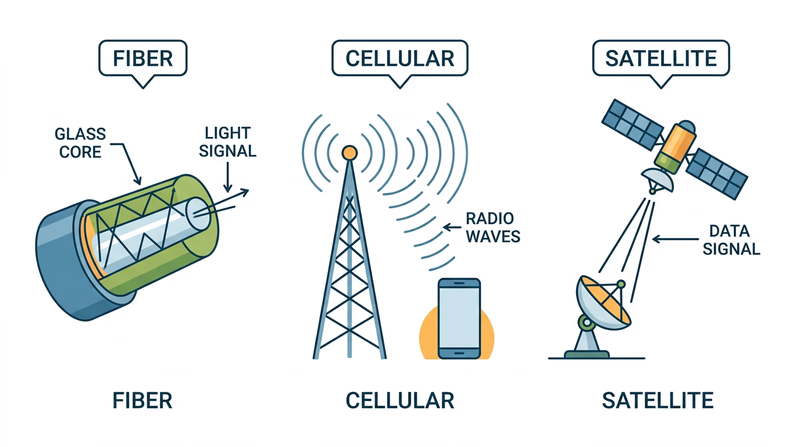
Fiber-optic cables transmit data as pulses of light through thin strands of glass or plastic. Light travels incredibly fast — close to 186,000 miles per second — making fiber the fastest method of internet data transfer.
- Speed: Up to 100 Gbps on modern fiber connections (consumer fiber plans typically offer 1–5 Gbps)
- How it works: A laser or LED at one end converts electrical data signals into light pulses. These pulses bounce along the inside of the glass fiber through a process called total internal reflection. At the other end, a photodetector converts the light back into electrical signals.
- Where it is used: Internet backbone connections between cities and continents (including undersea cables), fiber-to-the-home broadband, data center connections
Copper Cables (Ethernet and DSL)
Traditional copper cables carry data as electrical signals. Two main types:
- Ethernet cables connect devices within a building (LAN). Modern Ethernet (Cat6 and Cat6a) supports speeds up to 10 Gbps over short distances.
- DSL (Digital Subscriber Line) uses existing telephone copper wires to deliver internet to homes. DSL is slower than fiber (typically 10–100 Mbps) but available in more areas because it uses the phone lines already installed in most buildings.
Method 2: Wireless Connections
Wi-Fi
Wi-Fi uses radio waves to transmit data between a router and your devices over short distances (typically within a building).
- Speed: Wi-Fi 6 supports up to 9.6 Gbps in theory; real-world speeds are typically 100–500 Mbps
- How it works: Your router converts wired internet data into radio signals. Your device’s Wi-Fi antenna receives these signals and converts them back. The latest standard, Wi-Fi 6E, uses a wider range of radio frequencies to reduce congestion.
- Range: Typically 50–100 feet indoors, depending on walls and interference
Cellular Networks (4G/5G)
Cellular networks use a system of cell towers to provide mobile internet access over large areas.
- Speed: 4G LTE delivers 10–50 Mbps typically; 5G can reach 100 Mbps to over 1 Gbps
- How it works: Your phone communicates with the nearest cell tower via radio waves. The tower connects to the internet backbone through fiber-optic cables. As you move, your connection seamlessly hands off from one tower to the next.
- Where it is used: Mobile internet access anywhere with cell coverage — streaming, navigation, messaging, and more
Satellite Internet
Satellite internet beams data between ground stations and orbiting satellites using radio waves.
- Speed: Traditional satellite: 12–100 Mbps. Newer low-orbit systems (like SpaceX’s Starlink): 50–200 Mbps
- How it works: Your dish antenna sends a signal to a satellite orbiting Earth. The satellite relays the signal to a ground station connected to the internet backbone. Responses follow the reverse path.
- Where it is used: Rural and remote areas where laying cables is impractical — including on ships at sea, in wilderness areas, and in developing regions
Comparing Transfer Methods
| Method | Speed | Range | Best For |
|---|---|---|---|
| Fiber-optic | Up to 100 Gbps | Thousands of miles (backbone) | High-speed backbone, home broadband |
| Ethernet (copper) | Up to 10 Gbps | 100 meters per segment | LAN connections, office networks |
| Wi-Fi | Up to 9.6 Gbps | 50–100 feet indoors | Home and office wireless networking |
| Cellular (5G) | Up to 1+ Gbps | Miles from tower | Mobile internet access |
| Satellite | Up to 200 Mbps | Global | Remote and rural areas |
You now know how data physically moves across the internet. Next, let’s use that internet to actually find information — and learn how search engines work.