Req 5b — Search Engine Research
Billions of webpages exist on the internet, and search engines are the tools that help you find the right one in seconds. But getting useful results requires more than typing a few words and clicking the first link. This requirement teaches you how to search effectively — a skill you will use for the rest of your life.
How Search Engines Work
When you type a query into Google, Bing, or DuckDuckGo, you are not searching the entire internet in real time. Instead, you are searching the search engine’s index — a massive pre-built catalog of webpages that the engine has already discovered and analyzed.
The process works in three stages:
Crawling: Automated programs called web crawlers (or “spiders”) constantly browse the internet, following links from page to page and downloading content. Google’s crawlers visit billions of pages.
Indexing: The search engine analyzes each crawled page — its text, images, links, structure — and stores this information in a searchable database (the index).
Ranking: When you search, the engine scans its index for pages matching your query and ranks them by relevance using complex algorithms. Factors include keyword matches, page authority, freshness, and hundreds of other signals.
Search Strategies for This Requirement
You need to find ideas from at least three different websites about conducting a court of honor or campfire program. Here are strategies to get the best results:
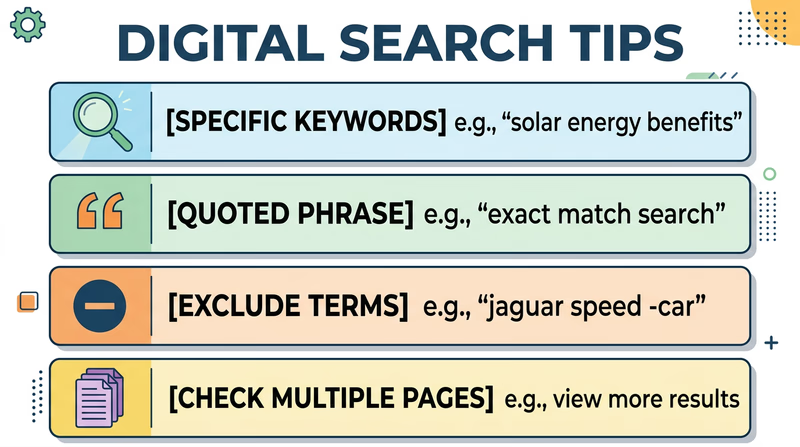
Use Specific Search Terms
Vague queries produce vague results. Be specific:
- Too broad: “Scout ceremony”
- Better: “troop court of honor ceremony ideas”
- Even better: “court of honor ceremony program script Scouts BSA”
Use Quotation Marks for Exact Phrases
Putting a phrase in quotes forces the search engine to find pages with those exact words in that exact order:
"court of honor"— finds pages with this specific phrase, not just pages mentioning “court” and “honor” separately"campfire program" activities songs— combines an exact phrase with additional keywords
Exclude Irrelevant Results with the Minus Sign
If your results include topics you do not want, use a minus sign to filter them out:
"court of honor" -military— excludes military results"campfire program" -summer camp -commercial— filters out summer camp business results
Look Beyond the First Page
The first few results are not always the best. Scroll past ads and check results on pages 2 and 3 for less popular but potentially more useful sources.
Evaluating Your Sources
Not every website is reliable. Before using information from a site, evaluate it with the CRAAP test:
| Criterion | What to Ask |
|---|---|
| Currency | When was the page last updated? Is the information current? |
| Relevance | Does the content actually address your specific topic? |
| Authority | Who wrote it? Is the author or organization qualified? |
| Accuracy | Can you verify the information from other sources? |
| Purpose | Is the page trying to inform, sell, or persuade? |
For Scout-related topics, look for content from:
- Official Scouting organizations and councils
- Established Scouting blogs and resource sites
- Experienced Scout leaders sharing tested programs
- Educational and nonprofit organizations
Research Planning Checklist
Complete these steps for your counselor
- Search for court of honor OR campfire program ideas using at least 3 different search queries
- Find ideas from at least 3 different websites (not all from the same source)
- Note the URL, website name, and author (if available) for each source
- Write down 2-3 specific ideas from each website
- Be ready to explain what search terms you used and how you refined your search
- Evaluate whether each source seems reliable using the CRAAP criteria
Ideas to Get You Started
Here are some angles to explore in your research:
For Court of Honor:
- Ceremony flow and program order
- How to recognize rank advancements and merit badge completions
- Guest speaker suggestions
- Decorations and setup ideas
- Roles for Scouts during the ceremony
For Campfire Program:
- Song selection and leading techniques
- Skit ideas appropriate for mixed audiences
- Storytelling tips and campfire stories
- How to structure a program with variety (songs, skits, cheers, quiet moments)
- Campfire opening and closing ceremonies
You have learned to harness the power of search engines. Now let’s explore how the internet keeps your data safe while it travels.