Req 5 — Manual vs. CAD Discussion
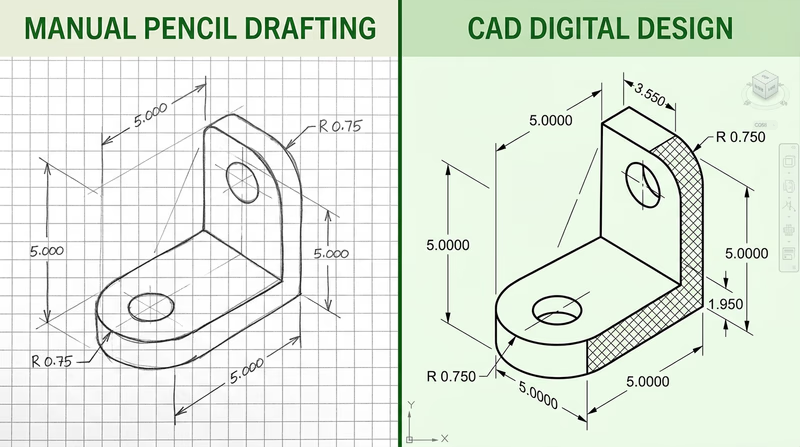
You have now created a drawing by hand and a drawing with CAD. You have also gone through the redline and revision process. This requirement asks you to step back and think critically about the differences between these approaches. Your counselor wants to hear your personal observations — not a memorized list of bullet points.
Reflecting on Your Experience
Think about these questions as you prepare for your discussion. Consider what you actually experienced, not just what you read about:
Speed and setup:
- How long did the manual drawing take compared to the CAD drawing?
- Which method had a steeper learning curve for you?
- How much time did you spend on setup (formatting paper, opening software, configuring settings) versus actual drawing?
Precision and accuracy:
- Which drawing turned out more precise? Why?
- Did you make dimensional errors with either method? How easy were they to catch?
- How did snapping and automatic dimensioning in CAD compare to measuring with a scale by hand?
Making changes:
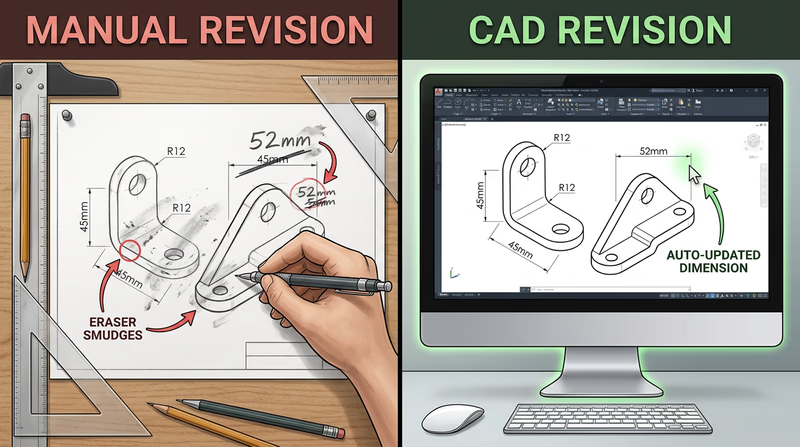
- Think back to Requirement 4 — when you received redline corrections, which drawing was easier to revise?
- On the manual drawing, did you have to erase and redraw? How clean was the result?
- In CAD, could you simply modify the geometry and have dimensions update automatically?
Key Benefits of CAD
Here are some widely recognized benefits of CAD that you should be prepared to discuss, supported by your own experience:
Precision Without Skill Decay
In manual drafting, precision depends on your hands. A tired drafter at the end of a long day draws less accurately than a fresh one in the morning. CAD does not get tired. Every line is mathematically exact, every dimension is calculated by the software, and every circle is a perfect circle.
Easy Revisions
This is often the single biggest advantage. In manual drafting, changing a wall thickness means erasing, redrawing, and re-dimensioning — and hoping the erased area does not leave ghost marks. In CAD, you select the wall, type a new thickness, and every related dimension updates. The revision you made in Requirement 4 probably demonstrated this difference clearly.
Reusability
A door symbol drawn once in CAD can be saved as a block and inserted into hundreds of future drawings. A title block template can be reused for every project. Manual drafting requires redrawing common elements every time.
Collaboration and Sharing
CAD files can be emailed, stored in the cloud, and worked on by multiple people simultaneously. Manual drawings must be physically transported or scanned.
Automatic Documentation
CAD software can automatically generate bills of materials, calculate areas, count components, and produce reports — tasks that require manual counting and calculation with hand drawings.
Software Discussion Points
Your counselor will want to know what software you used and what other options exist. Here is a framework for that discussion:
What You Used
Be prepared to describe:
- The name and version of the software
- Whether it was free, student-licensed, or paid
- What you liked and disliked about it
- Whether it was 2D-only, 3D, or both
Other Software Options
When discussing alternatives, organize them by category:
2D Drafting (traditional CAD):
- AutoCAD — The industry standard for 2D drafting since 1982
- LibreCAD — Free, open-source 2D CAD
- DraftSight — Professional 2D CAD with a free version
3D Parametric Modeling:
- SolidWorks — Widely used in mechanical engineering and manufacturing
- Fusion 360 (now Autodesk Fusion) — Free for personal use, combines CAD/CAM/CAE
- Onshape — Cloud-based, runs in a browser, free for education
- Inventor — Autodesk’s parametric modeling tool
Electrical/Electronics:
- KiCad — Free, open-source schematic and PCB design
- EAGLE — PCB design tool (now part of Autodesk Fusion)
- LTspice — Free circuit simulation software
Architectural (BIM):
- Revit — Building Information Modeling software from Autodesk
- SketchUp — 3D modeling tool popular for architectural visualization
- FreeCAD — Free, open-source parametric 3D modeler
Discussion Prep Checklist
Points to cover with your counselor
- How your manual and CAD drawings differed in process and result.
- At least three specific benefits of CAD that you experienced firsthand.
- How the revision process (Requirement 4) was easier or harder in each method.
- The name of the software you used and why you chose it.
- At least two or three alternative software options you are aware of.
- Your personal opinion on when manual drafting is still useful versus when CAD is clearly better.
When Manual Drafting Still Wins
Do not leave your counselor with the impression that manual drafting is obsolete. It is not. Engineers and architects still sketch by hand every day — on whiteboards, in notebooks, on napkins during lunch meetings. Hand sketching is faster for brainstorming, requires no computer, and develops your spatial thinking in ways that CAD cannot replicate. The rough sketches you made in Requirement 1a are a perfect example of where hand drawing excels.
The real takeaway: manual and CAD drafting are not competitors — they are partners. A skilled drafter uses both.