Req 6c — Understanding Electronics
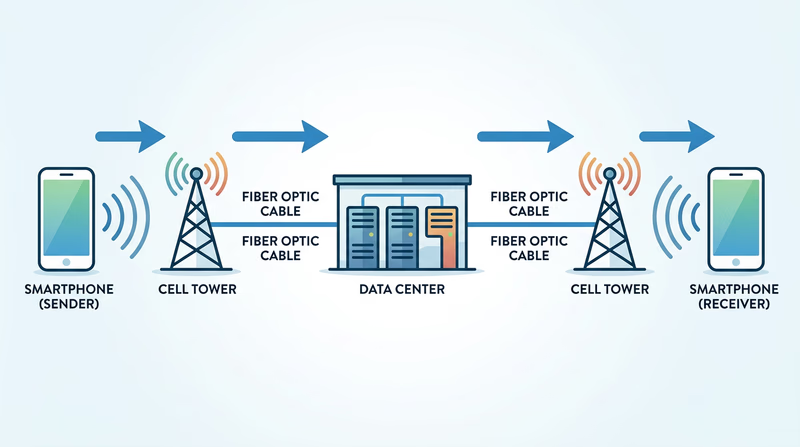
When you send a text message, it leaves your phone as a radio signal, hits a cell tower a mile away, travels through fiber-optic cables at the speed of light, bounces between data centers, and arrives on your friend’s phone — all in under a second. The engineering behind this journey involves electronics, telecommunications, software, and materials science all working together.
How Data Travels
Sound (Voice Calls and Voice Messages)
Your voice creates pressure waves in the air. Your phone’s microphone converts these pressure waves into an electrical signal — a rapidly changing voltage that mirrors the pattern of your voice. The phone’s processor then digitizes the signal, converting it from a continuous analog wave into a stream of numbers (binary data — ones and zeros).
This digital data is compressed (made smaller so it transmits faster) and sent as radio waves to the nearest cell tower. From there, the data travels through fiber-optic cables and network switches to the recipient’s cell tower, which sends it wirelessly to their phone. Their phone reverses the process: digital data becomes an electrical signal, and the speaker converts that signal back into sound waves your ear can hear.
Text Messages
Text is already digital — each letter, number, and emoji is assigned a numeric code (using a system called Unicode). When you type “Hello,” your phone converts those five characters into their numeric codes, packages them with addressing information (your phone number, the recipient’s number, a timestamp), and sends the package to the cell tower. The network routes the package to the correct destination, and the recipient’s phone decodes the numbers back into readable text.
Images and Video
A digital image is a grid of tiny colored dots called pixels. Your phone’s camera sensor captures light and records the color and brightness of each pixel. A typical smartphone photo contains 12 million pixels, which would create an enormous file — so the phone compresses the image (JPEG compression discards visual details your eye won’t miss) to shrink the file size by 90% or more.
Video works the same way, except it is a rapid sequence of images (typically 30 or 60 per second) combined with a synchronized audio track. Video compression is even more aggressive — it stores only the changes between frames, dramatically reducing the amount of data that needs to travel.
The Wireless Journey
All of this data — voice, text, images, video — reaches the cell tower via radio waves. Your phone transmits on specific frequencies assigned by the FCC. Modern phones use 4G LTE or 5G networks, which can transmit data at speeds fast enough to stream high-definition video in real time.
Designed for People: Ease of Use
Electronics engineers and industrial designers spend enormous effort making devices intuitive. For your phone or tablet, consider:
Touchscreen Interface
The capacitive touchscreen detects the electrical charge in your fingertip. Engineers designed the screen to respond to taps, swipes, pinches, and long presses — all without physical buttons. The goal: anyone can pick up the device and figure out the basics without reading a manual.
Display Quality
Modern phone screens pack over 400 pixels per inch — more than the human eye can distinguish at normal viewing distance. Engineers chose OLED or LCD technology, calibrated color accuracy, and designed auto-brightness sensors that adjust to ambient light.
Audio Design
Speakers, microphones, and noise-cancellation algorithms are engineered to deliver clear sound in noisy environments. The placement of microphones and speakers is carefully chosen based on how people naturally hold the device.
Designed to Work: Function
Engineers design smartphones to perform hundreds of functions reliably:
- Processor speed — The CPU handles billions of calculations per second, running apps, processing photos, and managing network connections simultaneously
- Battery management — Power management circuits balance performance with battery life, throttling the processor when full speed is not needed
- Thermal design — Heat sinks and thermal paste prevent the processor from overheating inside a sealed case
- Antenna design — Multiple antennas (cellular, Wi-Fi, Bluetooth, GPS, NFC) are crammed into a slim body without interfering with each other
Designed to Last: Durability
Consumer electronics face daily abuse — drops, water, dust, temperature swings. Engineers address durability through:
| Durability Feature | Engineering Solution |
|---|---|
| Drop resistance | Gorilla Glass or ceramic shield on the screen; aluminum or titanium frame |
| Water resistance | Rubber gaskets, adhesive seals, IP67/IP68 ratings |
| Dust protection | Sealed ports, mesh filters over speakers and microphones |
| Scratch resistance | Hardened glass rated 6+ on the Mohs hardness scale |
| Battery longevity | Charge management software that avoids stressing the battery |