Req 4 — How GPS Works and How to Teach It
Your GPS receiver feels almost magical the first time it guides you straight to a hidden container. But the magic is really timing, math, and satellites. Understanding what your device is doing helps you trust it wisely instead of blindly.
How GPS works
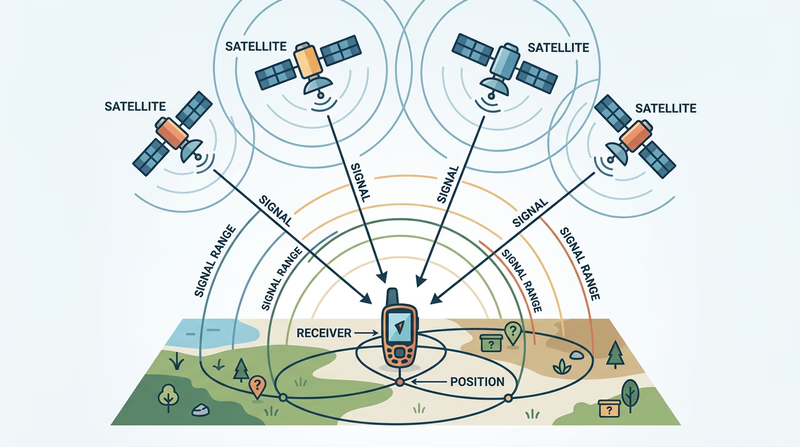
GPS stands for Global Positioning System. A network of satellites orbits Earth and constantly sends timing and location signals. Your receiver listens to several of those satellites at once and uses the travel time of the signals to calculate where you are.
To get a useful position, your device usually needs signals from at least four satellites. With those signals, it estimates your latitude, longitude, elevation, and time. The process is called trilateration. Your unit is not asking the satellites where you are. It is measuring how far away the satellites seem to be, then solving the position from those distances.
Why GPS is not perfect
GPS is usually very good, but several things affect accuracy:
- Trees and canyon walls can block or reflect signals.
- Tall buildings can interfere in urban areas.
- Cheap or older receivers may be less precise.
- Weather and satellite geometry can slightly affect readings.
- Your device settings may not match the listing format.
That is why geocaching always needs both technology and common sense. If your unit says you are there but the hiding spot makes no sense, pause and think.
Teaching GPS with the EDGE method
Scouting’s Teaching EDGE method gives you a simple way to show your counselor that you can do more than push buttons. EDGE stands for Explain, Demonstrate, Guide, Enable.
Explain
Start by describing what the feature does. For example: “A waypoint is a saved coordinate. Marking a waypoint lets me save an important place, like a cache site or trailhead, so I can return to it later.”
Demonstrate
Next, show the skill while talking through it. Open the waypoint screen, save the current location, and show how the name or symbol can be changed.
Guide
Then let the other person try while you coach them. Give short instructions and correct only what is needed.
Enable
Finally, have them do it on their own. If they can repeat the task without your help, you have taught it well.
What to Demonstrate
Skills your counselor expects to see
- Mark a waypoint: Save a location in the unit.
- Edit a waypoint: Change the name, symbol, or saved details.
- Change field functions: Customize which data fields appear on the screen.
- Change coordinate system: Switch the device to the format needed for the activity.
Marking and editing a waypoint
A waypoint can mark almost anything useful: parking, a trail junction, a final cache location, or a meeting point. The exact button names vary by device, but the steps are similar.
- Go to the waypoint or mark screen.
- Save the current position.
- Rename it so it means something later, such as “Trailhead” or “Cache 1.”
- Edit the symbol if that helps you recognize it.
- Save the changes.
Editing matters because a list of unnamed or poorly named waypoints becomes confusing fast.
Changing field functions
Many GPS screens let you choose what data appears in small information boxes, often called fields. You might show distance to destination, heading, elevation, speed, time of day, or estimated arrival time.
For geocaching, useful fields often include:
- Distance to destination
- Bearing or heading
- Accuracy
- Elevation
- Time
Changing field functions helps you tailor the screen to the job. A hiking screen may need different information than a simple urban cache walk.
Changing the coordinate system
This part trips up many beginners. A GPS unit can show coordinates in different formats. If the cache listing is written in one format and your unit is set to another, the numbers will not match correctly.
For example, a cache might be listed in degrees and decimal minutes, while your device could be set to decimal degrees or another system. You do not need to memorize every format. You do need to recognize that the setting matters and know how to change it.
How to prepare for your counselor demonstration
Practice with your own device before the meeting. Use a nearby park, trailhead, or even your driveway as a test waypoint. Mark it, rename it, edit it, switch a screen field, and change the coordinate format back and forth until the steps feel natural.
You do not need a fancy speech. You just need a clear explanation and a calm demonstration. If you narrate what you are doing and why, your counselor will see that you understand both the tool and the teaching method.
In Req 5, you will connect GPS skills to older navigation tools. That is a big part of becoming a confident navigator instead of someone who depends on only one device.