Req 8b — Travel Bug Mission
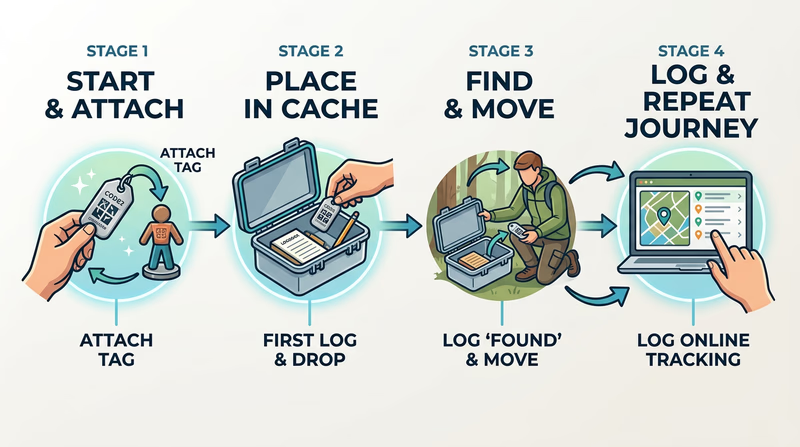
A Travel Bug® turns geocaching into a long-distance story. Instead of finding one container and going home, you create a trackable item with a mission and then watch how other geocachers move it from place to place. This option is fun because it combines creativity, Scouting values, and recordkeeping.
What makes a good Scouting-related Travel Bug
A Travel Bug starts with a trackable tag, but the attached item gives it personality. For this requirement, the item should connect clearly to a value of Scouting, such as helpfulness, bravery, friendliness, thriftiness, reverence, or conservation-minded behavior.
That does not mean it needs to be large or expensive. In fact, smaller and sturdier is usually better. The item should survive travel, fit in many public caches, and be easy for other geocachers to move.
Give it a mission
A good Travel Bug has a purpose. The mission could be to visit Scout camps, state parks, conservation areas, historic sites, or places connected to service. The mission should match the value you chose.
For example, a Travel Bug about conservation might aim to visit parks and protected areas. A Travel Bug about helpfulness might encourage geocachers to share one kind act in their online logs.
Good mission questions
- Where should this Travel Bug try to go?
- What Scouting value does it represent?
- What kind of logs would you like people to leave?
- Is the attached item durable enough for a long trip?
Travel Bug Design Checklist
What to think through before release
- Choose one Scouting value: Make the message simple and clear.
- Pick a durable attached item: Light, sturdy, and family-friendly works best.
- Write a mission goal: Give other geocachers a reason to move it.
- Plan your 30-day log: Decide how you will track locations, dates, and notes.
Releasing and monitoring it
After you activate the Travel Bug and attach the item, release it into an appropriate public cache with permission and care. Then monitor its movement online for 30 days. Your log should show what happened during that period, even if the Travel Bug does not travel far.
A good log can include:
- date released
- name and location of the release cache
- mission statement
- dates of movement
- who moved it and where it went
- anything surprising you noticed about its journey
Do not be discouraged if the Travel Bug moves slowly. Real geocaching depends on other people, and that is part of the lesson.
What this option teaches
This is really a lesson in follow-through. You are creating an item with a purpose, then patiently tracking what happens over time. That makes it different from a one-day project. It also helps you see geocaching as a community activity, because your Travel Bug depends on other people acting honestly and helpfully.
How to discuss it with your counselor
Be ready to explain three things clearly:
- What Scouting value you chose and why
- How your Travel Bug design and mission supported that value
- What happened during the 30-day monitoring period
Even if the bug barely moves, you can still talk about what you learned from planning, releasing, and logging it.
Geocaching.com — Travel Bug FAQ An official overview of how Travel Bugs work, what they are meant to do, and how geocachers track their journeys.This option shows how geocaching can carry a message from one cache to another. If you want an option with even more direct long-term responsibility, Req 8c focuses on hiding, maintaining, and eventually archiving your own public cache.