Req 4c — Digital Printing Run
Digital printing is probably the option most people use without even realizing it. School handouts, church bulletins, event programs, and short-run flyers often come straight from a computer file to a printer or digital press. This process is fast, flexible, and practical, which makes it a strong choice for many Scouts completing this badge.
Why Digital Printing Is Different
Unlike offset printing, digital printing does not require a traditional metal plate. The file goes directly from the computer to the machine. That means setup is faster, short runs are easier, and last-minute edits are much less painful.
This option is a great fit for designs that need 50 copies, quick turnaround, and clean paper output. It also connects directly to the digital image concepts you studied in Req 2 — Images, Halftones, and Digital Files.
Your Workflow
Digital Printing Workflow
Focus on file quality before you ever hit print
- Build the layout electronically: Use software that keeps text, images, and spacing organized.
- Check the file: Confirm page size, margins, image quality, and readability.
- Send it to the machine: Download or transfer the file to the printer or press.
- Print a proof: Review one or two copies before the full run.
- Produce 50 copies: Run the job once the proof looks correct.
If your counselor does not have a direct electronic interface, the requirement still lets you print a paper copy of the layout and scan it into the system. That is a useful reminder that production workflows can vary from one shop to another.
Common Digital Print Problems
Because setup is simpler, it is easy to think digital printing will take care of itself. It will not. A blurry image file stays blurry. A tiny headline stays tiny. A design with poor contrast still becomes hard to read when printed.
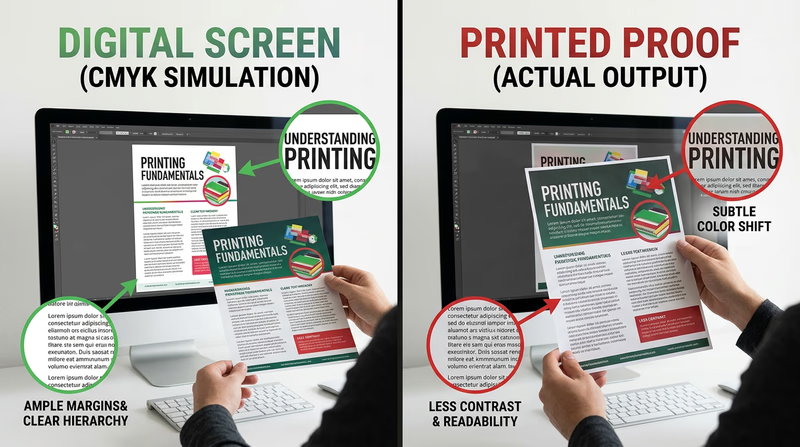
That is why proofing matters. Compare your print to your screen and look for:
- text that is too small
- colors that shift darker or duller on paper
- margins that feel crowded
- images that look soft or pixelated
- unexpected cropping or scaling
Use this quick video as a visual reminder of what digital printing means in a production context.
Hardware and Software You Might Use
A basic digital printing setup could include:
- a computer or laptop
- layout or publishing software
- a digital printer, copier, or production press
- optional scanner if the workflow needs to capture a printed original
This option is also the easiest place to talk about software choices from Req 3 — Design Choices and Production Planning. Explain what you used and why. Maybe you needed a simple page layout tool, or maybe you used more advanced publishing software because your project included precise text and images.
What Makes This Option Strong
Digital printing teaches an important lesson in modern graphic arts: fast does not mean careless. Good files, thoughtful proofing, and clear production choices still matter. If your design is practical, readable, and ready on time, you are thinking like a working print professional.
If you want to see a more traditional, hands-on printing path, the next page explores relief printing.