Req 1 — Safe Modelmaking
This requirement covers three safety areas you will use again and again in this badge: protecting your body while using hand tools, protecting your work and files while using digital tools, and protecting everyone nearby when heat, fumes, flammable liquids, or dust are involved. If you learn one habit from this badge, let it be this: do not begin a step until you understand the hazard.
Three Safety Questions
Ask these before you begin any modelmaking step
- What can hurt me? Sharp edges, hot surfaces, flying chips, dust, fumes, or moving parts.
- What keeps that from happening? Safe technique, guards, ventilation, clamps, and proper protective equipment.
- What do I do if something goes wrong? Stop the tool, move to a safe position, and get an adult right away.
Requirement 1a
A hobby knife can slip. A razor saw can jump out of a cut. Sanding can send tiny particles into your eyes. That is why modelmaking safety begins with body position, tool control, and the right protective equipment.
The first rule is simple: use the right tool for the job. Do not force a dull knife to act like a sharp one. Do not use scissors where a saw or snips are needed. A tool used the wrong way makes more mistakes and causes more injuries.
Set up your work so the material cannot slide around. Use a cutting mat, clamps, or a bench hook when needed. Keep your non-cutting hand out of the blade path. When possible, cut away from your body and make several light passes instead of one hard push. Light passes give you better control and reduce the chance that the blade will suddenly break through.
Protective equipment depends on the task. Safety glasses are a smart default any time you are cutting, drilling, sanding, snapping brittle material, or trimming wire. A dust mask or respirator may be needed if an adult has approved work that creates fine dust or fumes. Closed-toe shoes protect your feet from dropped tools and materials. Gloves are useful for some tasks, such as handling rough material, but they should not be worn around spinning tools unless the tool manual and supervising adult say they are safe there.
Good housekeeping is part of personal safety too. A cluttered bench hides blades, tangles cords, and makes spills more likely. Put caps back on markers and glue bottles. Store knives with blades retracted or covered. Sweep up scraps before they become slipping hazards.
Requirement 1b
Digital work can feel safer because you are using a mouse and keyboard, but digital design still has real risks. Some of those risks are to your files, some are to the machine, and some become physical the moment a design goes to a printer, cutter, or other fabrication tool.
Start with file safety. Save your work often, name files clearly, and keep versions when you make major changes. If you overwrite a good file with a bad edit, you can lose hours of work. Check units every time you begin a design. A part drawn in inches but exported as millimeters can come out far too large or too small.
Next comes machine safety. Digital fabrication tools follow instructions exactly, even if the design is wrong. Before you print or cut, check scale, wall thickness, clearances, and material choice. Use preview tools to spot unsupported parts, collisions, or impossible cuts. Make sure the software settings match the real machine and material you are using.
Digital tools also create physical hazards. A 3D printer has hot nozzles and heated beds. A laser cutter can start a fire if the material is wrong or the machine is left unattended. Moving gantries and belts can pinch fingers. Ventilation matters because some plastics, glues, and coatings release fumes when heated.
Finally, practice responsible digital behavior. Use approved software, follow your maker space or school lab rules, and do not download random files just because they look useful. If you borrow a design element, understand its license and give credit when appropriate. For this badge, your main project must still be your own original design.
Requirement 1c
Many modelmaking materials are useful because they dry fast, bond strongly, melt easily, or cut cleanly. Those same qualities can create hazards. Spray paint, solvent-based cement, resin, some cleaners, and certain plastics can be flammable, irritating, or unsafe to breathe.
Read the label before you open the container. If a material says to use it outdoors or with strong ventilation, follow that instruction exactly. Keep flammable products away from open flames, heaters, sparks, and anything that gets hot. That includes soldering tools, heat guns, and even a laser cutter that is being used on the wrong material.
Only use the amount you need. Leaving a whole bottle open increases fumes and spill risk. Cap containers promptly and store them in their original containers so the safety information stays with them. Never mix chemicals unless the instructions specifically say it is safe.
Protect your skin and eyes when required. Some adhesives bond skin almost instantly. Resins and hardeners can irritate skin or trigger allergic reactions. Paints and solvents can splash without warning. If hazardous materials get on your skin, in your eyes, or on your clothes, tell an adult immediately and follow the product instructions.
Disposal matters too. Some scraps can go in ordinary trash, but liquids, resin waste, solvent-soaked rags, and used containers may need special handling. Ask before throwing them away.
OSHA — Hand and Power Tools A practical overview of safe tool use, guarding, and common hazards that applies well to modelmaking benches. Link: OSHA — Hand and Power Tools — https://www.osha.gov/hand-power-tools OSHA — Eye and Face Protection Clear guidance on when eye protection matters and why flying particles are a serious hazard. Link: OSHA — Eye and Face Protection — https://www.osha.gov/eye-face-protection CDC/NIOSH — 3D Printing with Filaments Safety guidance for hot surfaces, fumes, ventilation, and protective practices when using filament-based 3D printers. Link: CDC/NIOSH — 3D Printing with Filaments — https://www.cdc.gov/niosh/docs/2020-115/ OSHA — Laser Hazards A helpful summary of why lasers require controlled procedures, supervision, and eye protection. Link: OSHA — Laser Hazards — https://www.osha.gov/laser-hazards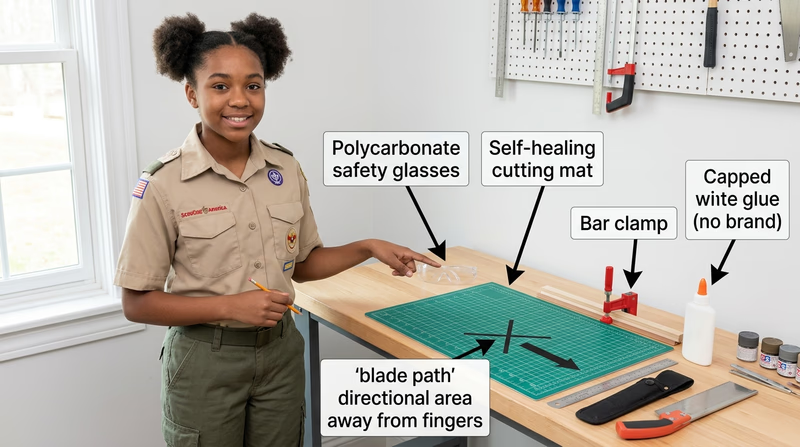
Once you know how to stay safe, you are ready to learn what different models are meant to do and which tools and materials fit each kind of project.