Req 2 — Models, Tools, and Materials
This requirement introduces the big picture. You will compare why different kinds of models exist, how traditional and digital tools help at different stages, and which materials make sense for different jobs. Once you understand those relationships, it becomes much easier to choose a project that matches your interests and skill level.
Requirement 2a
The easiest way to remember model types is to ask what question the model answers.
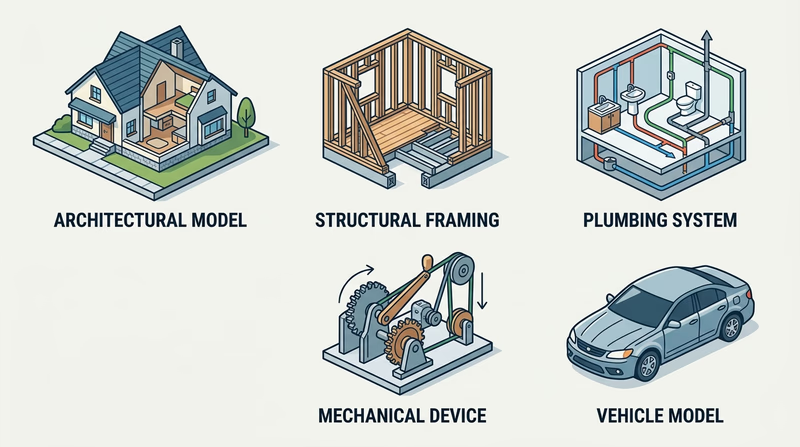
Architectural models answer, “What will this place look and feel like?” They show the shape of a building, the layout of rooms, the relationship between walls and windows, and sometimes the surrounding site. These are useful when an architect wants to explain a design to a client or compare design choices.
Structural models answer, “What keeps this thing standing?” Instead of focusing on decoration, they highlight beams, studs, rafters, joints, and supports. A structural model helps you see load paths and understand why a building resists gravity, wind, or weight.
Process models answer, “How does something move through a system?” Plumbing is a great example. A process model can show where water enters, where waste exits, and how venting supports proper flow. These models help make hidden systems easier to understand.
Mechanical models answer, “How does motion happen?” They show how levers, pulleys, gears, wedges, wheels and axles, and screws create or transfer force. A mechanical model is especially useful when a device needs to do work, not just sit on display.
Industrial models answer, “What will this product or vehicle look like in the real world?” They focus on form, proportion, user experience, and manufacturability. A vehicle model, for example, can help a designer study how the body, windows, and wheels work together as one product.
Requirement 2b
Traditional tools and digital tools often do the same jobs in different ways.
To create plans, traditional tools include graph paper, rulers, scale rules, compasses, triangles, and pencils. They teach careful measuring and help you think slowly through your layout. Digital tools let you set exact dimensions, copy repeated parts, and revise without redrawing the whole page.
To simulate function, a designer may build a quick physical mock-up from cardboard or foam to test shape and movement. Digital tools can go further by showing motion, interference, and fit before anything is built. A mechanical device can be checked for range of motion. A building model can be rotated and studied from every side.
To visualize models, hand sketches help you explore ideas quickly. Perspective sketches, elevations, and exploded views make your thinking visible. Digital tools can create clean renderings, shaded views, and multi-angle images that help other people understand what you mean.
To assist in construction, traditional tools help you mark, cut, clamp, sand, and assemble parts. Digital tools can produce templates, cut files, print files, and dimensions that reduce guesswork. A designer might sketch by hand, refine the design on a computer, print a test part, then finish the final assembly with hand tools. That mixed approach is common and smart.
Traditional vs. Digital
Both approaches are useful at different moments
- Traditional tools are excellent for quick idea generation, learning scale, and hands-on problem solving.
- Digital tools are excellent for precision, revisions, repeated parts, and machine-assisted fabrication.
- Best practice is often to combine them: sketch first, model second, build third, revise as needed.
Requirement 2c
Different materials are good at different jobs. Cardboard is cheap, easy to cut, and perfect for quick mock-ups. Foam board is light and clean for architectural walls and presentation pieces. Basswood and balsa wood are common when you want strength with a finished look. Styrene sheet and rod are popular for detail work because they cut cleanly and can be shaped accurately.
Modern modelmakers also use acrylic, resin, filament for 3D printing, laser-cut sheet materials, and digital files that never become physical until the final stage. A digital material can be just as real to a designer as cardboard or wood because it controls what the machine will produce.
Fabrication methods matter just as much as the material itself. Traditional methods include measuring, scribing, scoring, cutting, sanding, drilling, gluing, and painting. Modern methods include CAD modeling, slicing for 3D printers, exporting vector paths for laser cutting, and producing renderings for presentation.
When describing methods, connect them to the goal. If you need clean repeated window openings, laser cutting might help. If you want to test a rough shape fast, cardboard and hot glue may be better. If you need a curved engine housing for a fantasy spacecraft, digital modeling and 3D printing might save time.
🎬 Video: CardBoard Basics Tutorial Guide Chip/Matte Board model making: modeling for Designers & Architects — Eric Strebel — https://www.youtube.com/watch?v=x6s3lGH4MyI
You now know what kinds of models exist and what tools support them. The next step is choosing your own project and planning it carefully enough that the build can succeed.