Req 3 — Know Your Camera
A camera is a light-tight box with a very organized job: let in the right amount of light, focus it, record it, and save the result. Once you know the main parts, the camera becomes much less mysterious.
Main camera parts
Lens — The lens gathers and focuses light. Different lenses can show a wide view, a close-up view, or a distant subject. Some lenses zoom. Others stay at one focal length but may be brighter or sharper.
Aperture — Inside the lens is an opening that gets wider or narrower to control how much light enters.
Shutter — The shutter opens for a specific amount of time and then closes. That timing affects both exposure and motion.
Image sensor — In a digital camera, the sensor records the light and turns it into electronic data. You can think of it as the digital replacement for film.
Viewfinder or screen — This is how you compose the shot and review your settings.
Focus system — Manual or automatic focus helps the camera decide what should look sharp.
Memory card — The memory card stores the image files after the camera processes them.
Battery — Powers the camera, screen, autofocus, and often the flash.
Flash — Adds artificial light when the scene is too dark or when you want to brighten shadows.
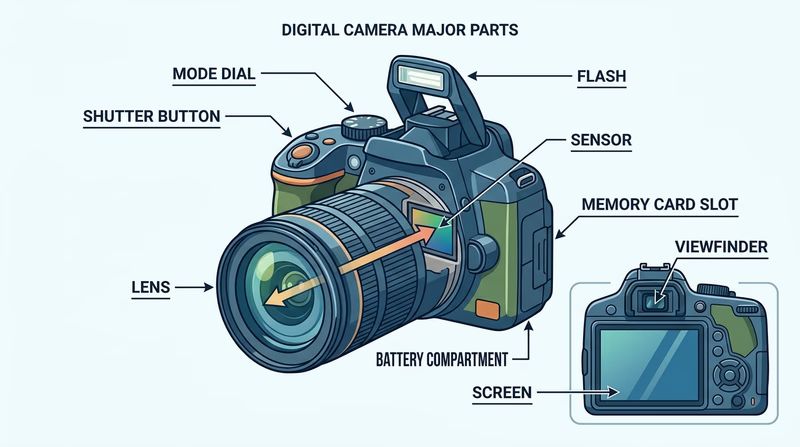
Know These Controls
You should be able to point to these on your own camera
- Power button: Turns the camera on and off.
- Shutter button: Usually half-press to focus, full press to take the photo.
- Mode dial or camera modes: Chooses auto, portrait, sports, manual, and other shooting modes.
- Menu and playback controls: Lets you change settings and review images.
- Zoom control or lens ring: Changes framing if your camera supports zoom.
How a picture is made
When you press the shutter button, several things happen in order:
- The camera meters the light in the scene.
- It focuses on the chosen subject area.
- The aperture sets how wide the lens opening should be.
- The shutter opens for the selected time.
- Light hits the sensor.
- The camera processes that light into an image file.
- The file is saved to the memory card.
That whole process may happen in a fraction of a second, but each step matters. If the focus is wrong, the subject may be soft. If the shutter stays open too long, motion may blur. If not enough light reaches the sensor, the image may be too dark.
Why an exposure can fail
A bad exposure does not always mean “too dark.” It can also mean highlights are blown out, shadows are muddy, or the camera chose settings that do not match the photographer’s goal.
For example:
- A basketball shot might be bright enough but blurry because the shutter was too slow.
- A portrait might be sharp but distracting because the background stayed too detailed.
- A sunset might lose color if the camera brightens the scene too much.
This connects directly to Req 2, where you learned how light, aperture, shutter speed, ISO, and composition affect the result.
Official Resources
🎬 Video: Photography Basics in 10 Minutes (video) — https://youtu.be/V7z7BAZdt2M?si=0XATnG-lMciqFgr0
🎬 Video: Parts of a Camera (video) — https://youtu.be/BsSjEhktkzU
🎬 Video: How Digital Cameras Work (video) — https://youtu.be/Ey6S3rKH_o4
Understanding the camera makes the next set of photo exercises much easier.