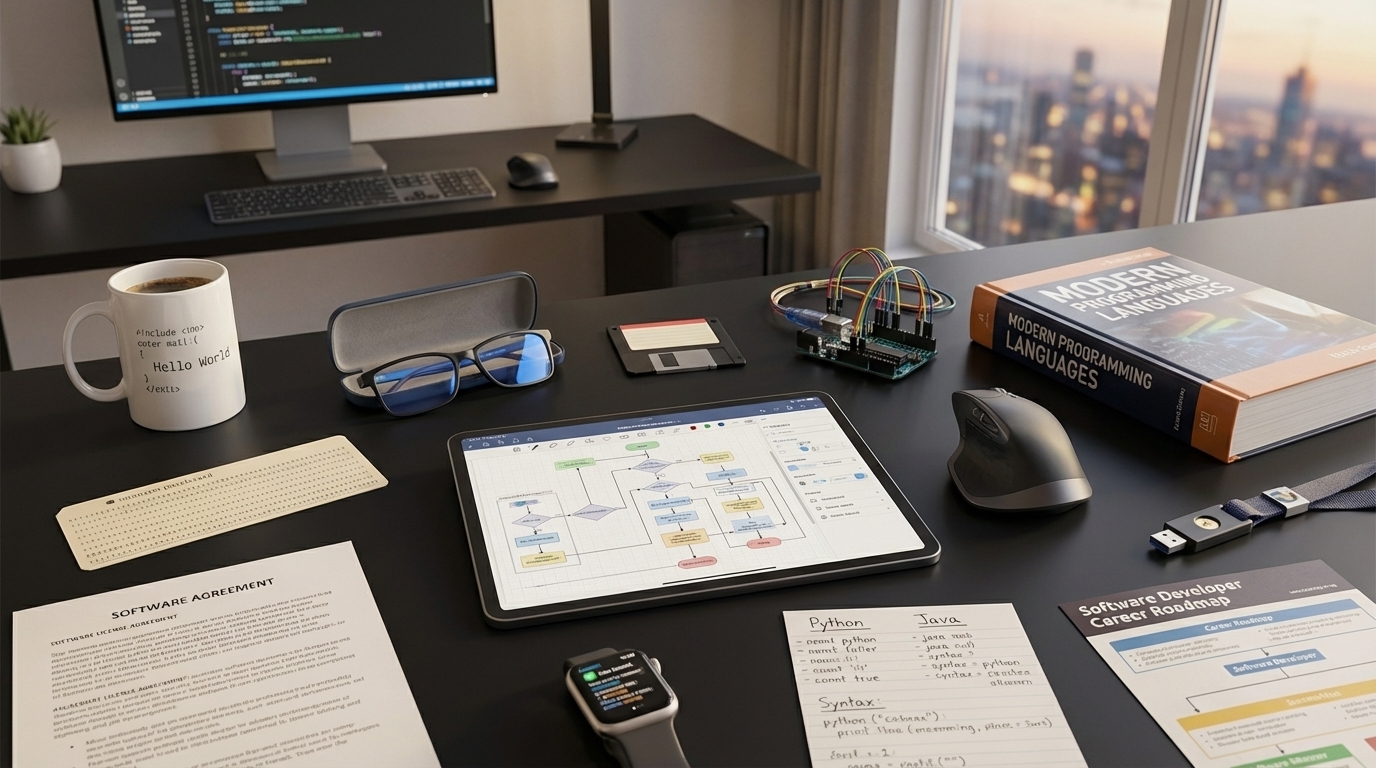
Programming Merit Badge — Complete Digital Resource Guide
https://merit-badge.university/merit-badges/programming/guide/
Introduction & Overview
Programming is how people turn ideas into actions a computer can actually perform. Every game menu, weather app, smartwatch alert, and traffic light controller depends on instructions written by a programmer. This merit badge gives you a behind-the-screen view of how software works — and then asks you to build some of it yourself.
You do not need to start as an expert. Good programmers begin by noticing problems, breaking them into steps, testing small pieces, and improving what they made. Along the way, you will learn how code developed over time, how different languages are used, how to protect creative work, and how programming can become a project, a hobby, or even a career.
Then and Now
Then — Instructions for Giant Machines
Early computers were not pocket-sized, battery-powered devices. They filled rooms, used huge amounts of electricity, and were programmed with switches, cables, or punched cards. In the 1800s, Ada Lovelace described how a machine might follow a series of instructions to do more than arithmetic, which is why many people call her the first computer programmer. In the 1900s, programmers wrote code for machines like ENIAC by thinking carefully about every step because computers had very little memory and almost no room for mistakes.
Back then, programming was slower and more physical. A bug might mean a stack of punched cards had to be fixed and run again. But the big idea was already there: if you can describe a process clearly enough, a machine can help you do it.
Now — Code Is Everywhere
Today, programming touches almost every part of daily life. It runs websites, robots, cash registers, video games, medical devices, weather forecasts, and the tools Scouts use to map trails or track fitness. Modern languages let programmers build faster, test more easily, and collaborate with people all over the world.
Programming is also more accessible than ever. You can learn with drag-and-drop blocks, type real code in a browser, or build apps on a laptop at home. The tools have changed, but the core challenge is the same: solve a problem clearly enough that a computer can follow your instructions exactly.
Get Ready!
Programming rewards patience, curiosity, and a willingness to test ideas. If something does not work the first time, that does not mean you failed — it means you found the next clue.
Kinds of Programming
Programming is a broad field. Here are some of the main areas you may notice as you work through this badge.
Web Programming
Web programmers build the sites and web apps you use through a browser. They work with languages like HTML, CSS, and JavaScript to create pages that look good, respond to clicks, and update with new information.
If you have ever used an online calendar, watched a video site load, or filled out a form on a troop website, you have used web programming.
App Programming
App programmers create software for phones, tablets, and computers. Their job is to make programs that are useful, reliable, and easy to understand. Some apps help people learn, some keep businesses running, and some are just plain fun.
Game Programming
Game programmers combine logic, art, sound, and storytelling. They build rules, scoring systems, movement, collision detection, menus, and artificial behaviors that make a game feel alive.
Physical Computing and Robotics
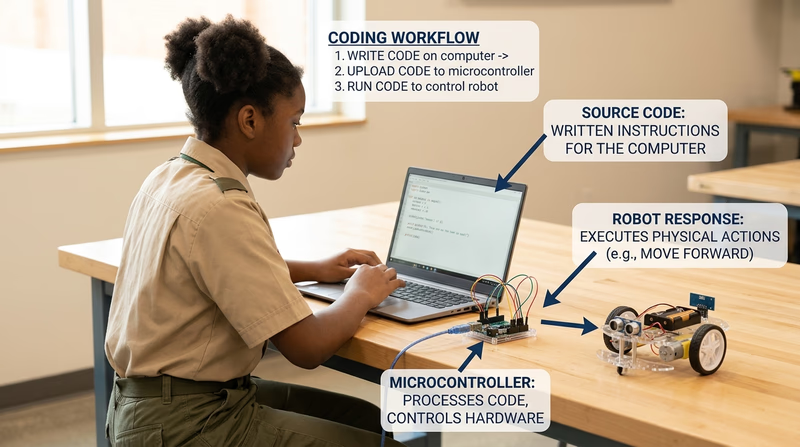
Not all programming stays on a screen. Some code controls robots, sensors, drones, traffic signals, thermostats, and wearable devices. In these projects, software connects to the physical world.
Data and Automation
Some programmers write code to organize information, spot patterns, or automate repeated tasks. A small script can rename files, total scores, clean up a spreadsheet, or graph weather readings faster than doing it by hand.
Creative Coding
Programming can also be a creative tool for music, animation, digital art, storytelling, and interactive media. Code is not only about business or engineering. It can also help you express an idea in a way other people can see, hear, or play.
Next Steps
You are about to start with something every programmer needs: safe habits. That includes digital safety, smart online behavior, and taking care of your body while you work at a screen.
Req 1 — Digital Safety and Coding Health
Programming looks safe because most of the work happens at a desk, but coders still need real safety habits. This requirement covers two big areas:
- Digital safety — how to protect yourself, your information, and your reputation online
- Coding health — how to prevent the strain and fatigue that can come from long sessions at a screen
Requirement 1a
A strong programmer is not just someone who can write code. It is also someone who knows how to behave wisely in digital spaces. When you learn online, share code, join forums, or collaborate on projects, you leave a digital trail. That trail can help you build trust — or create problems if you move too fast.
Personal Safety Awareness "Digital Safety" video Open this official Scouting America page first so you can watch the Digital Safety training without hunting for it later on the page. Link: Personal Safety Awareness "Digital Safety" video — https://www.scouting.org/training/youth-protection/scouts-bsa/What digital safety means for programmers
Programmers often sign up for websites, save projects in the cloud, download tools, and ask questions in online communities. That creates a few extra responsibilities:
- protect accounts with strong passwords and, when possible, multi-factor authentication
- think before sharing your real name, school, location, or schedule
- download software only from trusted sources
- treat online comments, chat rooms, and shared code spaces like public places
- remember that copying someone else’s work without permission is not only dishonest, it can also expose you to unsafe files or bad advice
Digital safety habits for a young programmer
Use these before you click, post, or download- Stop and verify the source: If a link, file, or message seems rushed, strange, or too good to be true, check it with a trusted adult.
- Use strong account protection: A long password or passphrase is better than a short clever one.
- Keep personal details private: Share only what is needed for the project.
- Ask before joining platforms: Some coding sites have social features, messaging, or public profiles.
- Read the rules: Community guidelines tell you what behavior is expected and what information should stay private.
Questions to bring to your counselor
After watching the video, be ready to discuss questions like these:
- What kinds of information should stay private online?
- What would you do if a stranger asked to move a conversation off a safe platform?
- How can you tell whether a site or download is trustworthy?
- Why is it smart to involve a parent or guardian before joining a new online coding community?
Requirement 1b
The most common programming injuries do not come from explosions or sparks. They come from repetition, posture, and long stretches of intense focus. A sore wrist, tight shoulders, dry eyes, or a headache can turn a fun project into a miserable one.
Repetitive stress injuries
A repetitive stress injury happens when the same motion is repeated so often that muscles, tendons, or nerves become irritated. For programmers, that usually means a lot of typing, mousing, tapping, or holding the same position for too long.
Common warning signs include:
- aching or burning in your fingers, wrist, forearm, shoulder, or neck
- tingling or numbness
- reduced grip strength
- pain that gets worse during or after a coding session
First aid for repetitive stress
The first step is to stop the activity that is causing the pain. Rest the area. Gently stretch if that does not make it worse. Switching hands, changing your chair height, or moving your keyboard and mouse can also help reduce stress on the same muscles.
🎬 Video: Treating Repetitive Stress (video) — https://www.youtube.com/shorts/1yp0jOyARCk
Eyestrain
Eyestrain happens when your eyes work hard for a long time without enough breaks. Staring at a screen can make you blink less, which dries your eyes and makes them tired.
Signs of eyestrain include:
- dry, itchy, or watery eyes
- blurry vision
- headaches
- trouble focusing after long screen time
- feeling extra tired even if the project itself is going well
First aid and prevention for eyestrain
The simplest prevention habit is the 20-20-20 rule: every 20 minutes, look at something about 20 feet away for 20 seconds. That gives your eye muscles a short reset.
Other helpful habits include:
- sit far enough from the screen that you are not leaning in all the time
- raise or lower the monitor so you are not craning your neck
- reduce glare from bright windows or overhead lights
- increase text size instead of squinting
- blink on purpose during long work sessions
🎬 Video: Treating Eye Strain (video) — https://www.youtube.com/watch?v=j3ff4aeItl0
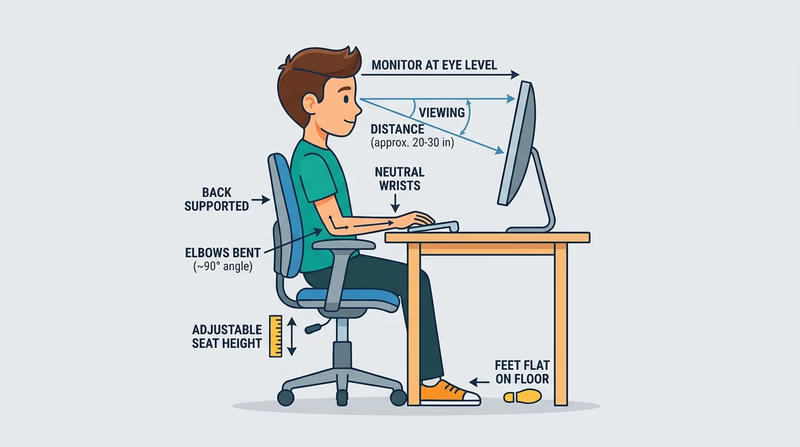
Before you move on, make sure you can explain both prevention and first aid. Your counselor is not just looking for vocabulary. They want to hear that you know how to code safely over time.
Req 2 — From Punch Cards to Python
Programming history is really the story of people trying to make machines do more useful things with less effort. At first, programming meant giving extremely detailed instructions to giant machines. Over time, languages became easier for humans to read, computers became faster and smaller, and programming spread from research labs into homes, schools, businesses, and pockets.
A good discussion with your counselor should do more than list dates. Show how each milestone changed what programmers could build, who could build it, or how fast they could work.
A simple timeline to know
1. Early ideas — Ada Lovelace and machine instructions
In the 1840s, Ada Lovelace wrote about how Charles Babbage’s proposed Analytical Engine might follow instructions to manipulate symbols, not just numbers. The machine was never fully built, but the idea mattered: a machine could follow a sequence of operations designed by a person.
2. Early electronic computers — hardwired and low-level programming
In the 1940s, computers like ENIAC used switches, cables, and later machine code. Programming was difficult because the instructions were close to the hardware itself. A small mistake could keep the whole system from working.
3. High-level languages — FORTRAN and COBOL
In the 1950s, programmers developed languages that looked more like human reasoning. FORTRAN helped scientists and engineers write mathematical programs more efficiently. COBOL made business data processing easier to manage. This was a major shift because programmers no longer had to write every instruction in raw machine language.
4. Structured programming — clearer logic
Languages and methods in the 1960s and 1970s pushed programmers toward clearer structure with loops, conditionals, and reusable blocks. This helped large projects become easier to read, test, and maintain.
5. Personal computers — programming reaches individuals
In the late 1970s and 1980s, personal computers put programming in homes and schools. BASIC became a common first language for many learners. Suddenly, programming was not only for governments, universities, and big companies.
6. The web era — software becomes connected
In the 1990s, the growth of the internet changed programming again. Languages like JavaScript helped make websites interactive. Programmers were no longer only building stand-alone software. They were building connected systems used by millions of people.
7. Modern languages and open-source collaboration
Today, languages like Python, JavaScript, Java, C#, Swift, Kotlin, and many others help programmers build tools for data science, web apps, games, robotics, artificial intelligence, and mobile devices. Open-source platforms also make it easier for people to learn from real projects and contribute from anywhere.
Three milestones you could discuss
If you need help choosing milestones, these are strong examples:
Milestones worth bringing to your counselor
Pick at least three and explain why they mattered- High-level languages: They made programming more readable and less tied to machine hardware.
- Personal computers: They gave everyday people access to programming tools.
- The internet and web programming: They turned software into a connected experience instead of a single-machine activity.
- Open-source collaboration: It made shared learning and large volunteer projects possible.
- Modern beginner-friendly languages: They lowered the barrier to entry for new programmers.
How language evolution changed programming
Programming languages evolved because programmers kept running into the same problem: computers need precise instructions, but humans need tools that are easier to understand. Newer languages often improved one or more of these areas:
- readability — code became easier to follow
- speed of development — programmers could build more in less time
- safety — some languages help catch mistakes earlier
- portability — code could run on different systems
- specialization — some languages became better for web, science, mobile, or embedded systems
🎬 Video: 5 Minute Video of Programming Language History (video) — https://youtu.be/K5yv7dY17EA?si=yYdqNCZwa0w0SzJs
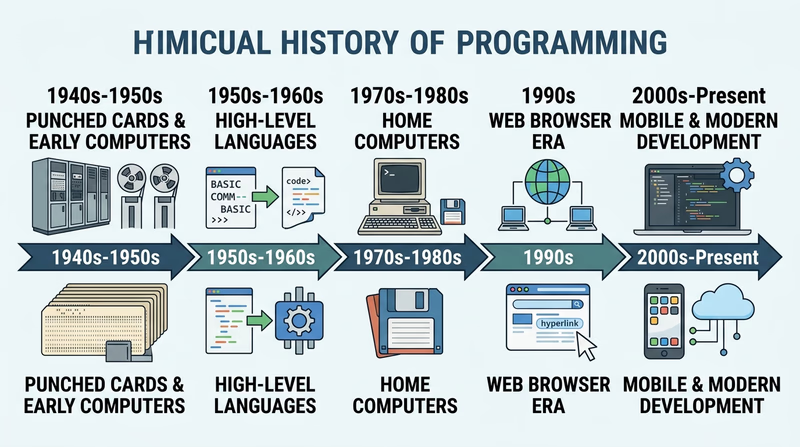
Before you leave this page, make sure you can explain not only what changed, but why those changes mattered to real programmers.
Req 3 — Languages and Everyday Code
This requirement helps you see programming from two angles. First, you will compare languages and the jobs they are good at. Then you will look around your own day and notice how many ordinary devices depend on code.
Requirement 3a
A programming language is a tool, not a trophy. No language is best at everything. Different industries choose languages based on speed, reliability, available libraries, hardware limits, team experience, and the kinds of problems they solve most often.
Here is a useful way to think about five common languages.
| Language | Often used in | Why industries choose it |
|---|---|---|
| Python | data science, automation, education, AI, web back ends | Easy to read, huge library ecosystem, quick to prototype |
| JavaScript | web front ends, web back ends, interactive sites | Runs in browsers and powers much of the modern web |
| Java | enterprise software, Android, large business systems | Mature tools, strong performance, portable across systems |
| C# | game development, business apps, desktop tools | Strong Microsoft ecosystem and popular for Unity game projects |
| C/C++ | operating systems, game engines, robotics, embedded systems | Fast and close to hardware when performance matters |
You do not have to use these exact five, but your list should show range. Try to include languages used in different settings instead of five that all do almost the same job.
Eight Popular Programming Languages, Their Industries and Coding Examples (PDF) This official overview gives examples of common languages, sample code, and the kinds of industries that rely on each one. Link: Eight Popular Programming Languages, Their Industries and Coding Examples (PDF) — https://filestore.scouting.org/filestore/Merit_Badge_ReqandRes/Requirement%20Resources/Programming/Req3-General.docxRequirement 3b
This part is about noticing the invisible software around you. Many devices do not look like computers, but they still run programs that take input, make decisions, and produce output.
Three strong examples might include:
Smartphone
A smartphone takes input from touches, cameras, microphones, GPS, and sensors. Its programs decide how to respond, display maps, send messages, play media, and manage battery use. You probably rely on it for communication, directions, weather, calendars, or school information.
Car or family vehicle systems
Modern vehicles contain many small computers. Programs help control braking, engine timing, dashboard warnings, navigation, backup cameras, and even climate control. Even if you are not the driver, you still rely on those systems for safety and transportation.
Home router or Wi-Fi equipment
Your internet connection depends on programmed devices that direct traffic, manage security, and connect many devices at once. Most people never see that code, but it is one reason their laptops, tablets, and game systems work.
Other good examples could be a smartwatch, microwave, game console, traffic signal, thermostat, alarm clock, or school Chromebook.
Choosing your three devices
Pick examples you actually use and can describe clearly- Choose devices from different parts of life: communication, transportation, home, health, or entertainment.
- Explain what input the device receives.
- Explain at least one decision the program makes.
- Explain what output the device gives you.
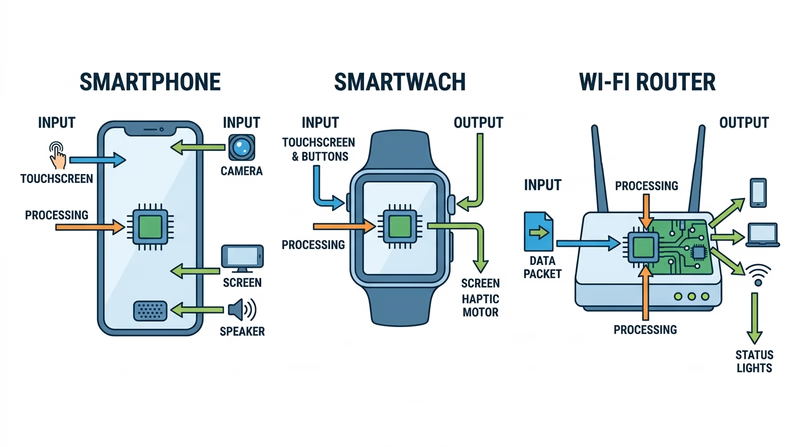
In Req 2, you looked backward at programming history. Here, you can see the result: programming is now woven into the tools people depend on every day.
Req 4 — Intellectual Property and Software Use
Programming is creative work. When someone writes software, designs a logo, creates documentation, or invents a new technical process, the law may protect that work in different ways. This requirement helps you understand the main protection types and the rules that tell people how software may be used.
Requirement 4a
The four big types are copyright, trademark, patent, and trade secret.
Copyright
Copyright protects original creative expression. In software, that usually includes the actual code someone wrote, certain graphics, sounds, and written documentation. It does not protect the general idea of “a to-do list app,” but it can protect the specific code and creative material used to build one.
Trademark
Trademark protects names, logos, and symbols that help people recognize a brand. A programming company might trademark the name of its app or its logo so other companies cannot confuse customers by pretending to be connected to that brand.
Patent
A patent protects certain inventions or processes for a limited time. Software-related patents can be complicated, but the main idea is that a new and non-obvious technical method may qualify for protection in some cases.
Trade secret
A trade secret protects valuable information a company keeps private, such as an algorithm, process, or method that gives it an advantage. Trade-secret protection depends on keeping the information secret.
How the four types differ
A quick way to keep them straight- Copyright protects creative expression.
- Trademark protects brand identity.
- Patent protects certain inventions or technical methods.
- Trade secret protects valuable information kept confidential.
Requirement 4b
When you buy software, you often are not buying full ownership of the software itself. You are usually buying a license, which is permission to use it under certain rules.
Owning a physical item like a book means you can lend that copy, keep it, or give it away. Software is different because the creator usually keeps the rights to the program. Your license might limit how many devices can use it, whether you can change it, whether you can share it, or how long you may access it.
This is why a subscription app can stop working if the subscription ends, and why downloading one paid copy for many friends is not allowed.
The Difference Between Licensing and Owning Software (PDF) This official explanation helps you discuss why most software users receive permission to use software rather than full ownership rights. Link: The Difference Between Licensing and Owning Software (PDF) — https://filestore.scouting.org/filestore/Merit_Badge_ReqandRes/Requirement%20Resources/Programming/Req4-IP.docxRequirement 4c
These three categories are easy to mix up, but they are not the same.
Freeware
Freeware is software you can use at no cost, but the creator still controls what you may do with it. You might be allowed to install it for personal use but not change it or redistribute it.
Open source
Open-source software makes its source code available under a license that allows people to study, use, modify, and often share it. But open source still has rules. Some licenses require you to include the original license, give credit, or share changes under the same terms.
Commercial software
Commercial software is sold for money or used to support a business model. It may be installed once, rented by subscription, or offered through an account. Commercial does not mean bad. It just means the software is part of a business product or service.
Why respect the terms? Because programmers deserve credit for their work, companies and nonprofits depend on those rules to keep projects running, and ignoring the license can be unfair or illegal.
🎬 Video: Open Source VS Commercial Software (video) — https://www.youtube.com/watch?v=SdW5pnha9kg
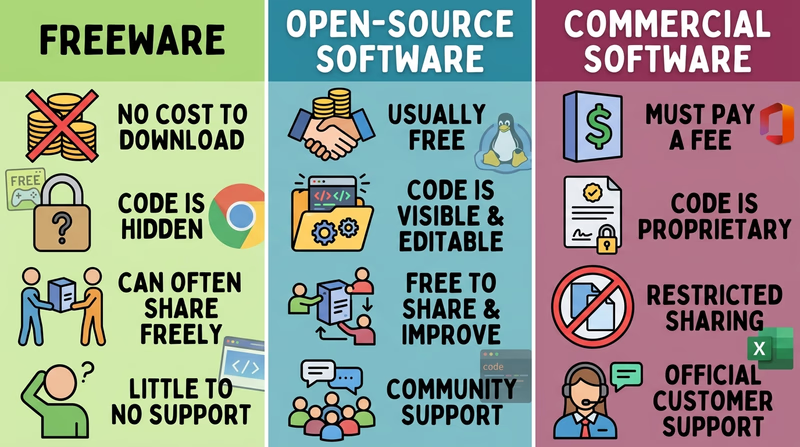
As you begin your own projects in the next requirement, this topic becomes practical. Every time you install a tool, reuse a library, or share your work, you are making choices about software rights and responsibilities.
Req 5 — Choosing Your Three Projects
You must choose exactly three options here — and in this badge, that means all three project pages. The real choice is not whether to do three projects. It is which three languages and development environments will help you learn the most.
Your Options
- Req 5a — First Language Project: Build your first project in a language and toolset that feels approachable. This is your chance to understand the core pattern of input, logic, output, debugging, and explanation.
- Req 5b — Second Language Project: Build a second program in a different language and environment so you can compare how tools, syntax, and workflow change.
- Req 5c — Third Language Project: Finish with a third language and environment that stretches you a little more and shows how widely programming skills transfer.
How to Choose
Choosing your three languages and environments
Pick combinations that show variety without becoming overwhelming- Start with confidence: Make your first project in a language or platform where you can get a working result fairly quickly.
- Change something meaningful: Your second and third choices should differ in language, development environment, or style of project.
- Match the environment to the job: A browser editor, desktop IDE, robotics tool, or game engine each teaches different habits.
- Think about what you will gain: One project might teach clear syntax, another debugging tools, and another how software connects to real users or devices.
- Keep the scope reasonable: A small program that works and that you can explain is better than a giant project you do not fully understand.
A strong set of three might look like this:
| Project | Possible language/environment | What you gain |
|---|---|---|
| First | Python in a beginner-friendly editor | Clear logic and readable syntax |
| Second | JavaScript in a browser or web editor | Fast feedback and interactive output |
| Third | Scratch, MakeCode, Java, C#, or another tool with a different style | A wider view of how programming ideas transfer |
Before you move to the first project page, make sure each planned program includes the same four ingredients:
- Input from a user, sensor, file, button, or other source
- Computation such as math, comparison, sorting, counting, or transformation
- Decision making using if/then logic or similar control flow
- Output that clearly shows the result
The next three pages will help you build and explain each project one at a time.
Req 5a — First Language Project
Your first project is where you build the pattern you will repeat for the rest of this badge: plan a small program, make it work, debug it, and explain it clearly. This is a great place to choose a language that feels readable and an environment that gives you quick feedback.
What your first project should do
The requirement gives you a clear target. Your program must:
- take input
- make computations
- use decisions based on the input
- produce output
That means a program that only prints “Hello, world” is too simple. A stronger first project might:
- ask for a user’s age and decide which ticket price applies
- ask for test scores and calculate an average
- ask for camping gear counts and warn if a required item is missing
- ask for weather conditions and suggest an activity based on rules you choose
Build small on purpose
Many beginners try to impress people with a huge idea. That usually leads to confusion, unfinished features, and bugs you cannot explain. A better plan is to build a small program with logic you understand completely.
A good first project
Use this to test whether your idea fits the badge- The input is clear and easy to demonstrate.
- The program has at least one meaningful calculation.
- The program uses decision logic such as if/else or match/case.
- The output clearly changes based on what the user entered.
- You can explain each major part without guessing.
Debugging is part of the requirement
A bug is simply a mistake in the program’s behavior. You are expected to find and fix problems. That is not a side task — it is part of how programming works.
Common first-project bugs include:
- forgetting to convert text input into a number
- checking the wrong condition in an if statement
- using the wrong variable name
- outputting a result before the calculation is finished
How to explain your program to your counselor
When you demonstrate the project, walk through it in a simple order:
- Input — What does the user enter?
- Processing — What calculations happen?
- Decision making — What rules decide what happens next?
- Output — What result does the user see?
If you can tell that story clearly, you are not just showing code. You are showing understanding.
MDN Web Docs — Learn programming MDN offers clear beginner lessons on programming logic, debugging, and building small projects you can actually explain. Link: MDN Web Docs — Learn programming — https://developer.mozilla.org/en-US/docs/Learn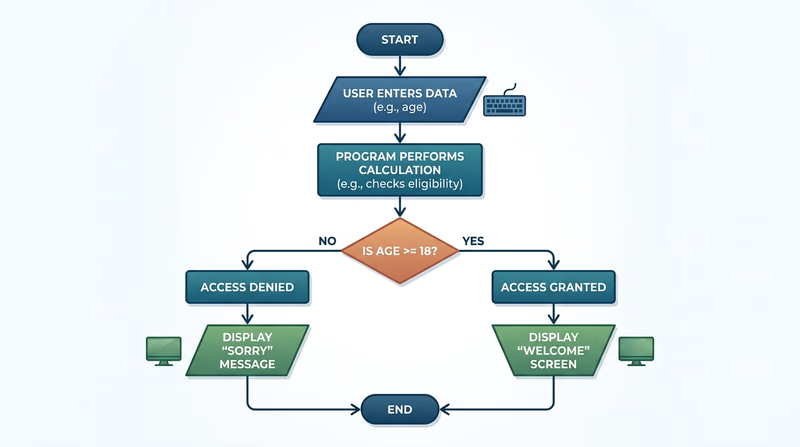
Once you finish this first project, you will have a model to reuse. The next two projects should show what stays the same across languages — and what changes.
Req 5b — Second Language Project
Your second project is your chance to compare. After building one program already, you now know the badge is not only about getting code to run. It is about noticing how different languages and development environments solve similar problems in different ways.
What should be different this time?
If your first project used a typed language in a browser, maybe your second one should use a desktop editor. If your first project produced text output, maybe your second should create a visual response, a game action, or a device behavior. The idea is to make a meaningful comparison.
Things that can differ between projects include:
- how you write syntax
- how variables and data types are handled
- what tools help you debug
- how the program takes input
- what the output looks like
🎬 Video: Programming Merit Badge Welcome! From AutomationDirect (video) — https://www.youtube.com/watch?v=s07aEbPwThM
Compare the workflow, not just the code
Suppose you write one project in Python and another in JavaScript. The important insight is not only that the words look different. It is that the whole workflow may change. One environment may run instantly from the command line, while another shows the results in a browser. One may highlight errors before you run the code. Another may make it easier to inspect variables while the program is running.
Questions to ask during your second project
These will help you compare languages intelligently- What was easier in this language than in the first one?
- What was harder or more confusing?
- How did the development environment help you spot bugs?
- Did input, output, or testing feel different?
- Would you choose this language again for the same kind of problem?
Demonstrate growth
Your counselor will likely notice whether the second project shows more confidence than the first. That could mean:
- testing more than one example input
- explaining your logic more clearly
- fixing a bug more quickly
- organizing the code into easier-to-read parts
The program does not need to be huge. It just needs to show that you are getting better at thinking like a programmer.
GitHub Docs — Hello World GitHub's beginner documentation is useful if your second environment involves saving code, tracking changes, or sharing work online. Link: GitHub Docs — Hello World — https://docs.github.com/en/get-started/start-your-journey/hello-world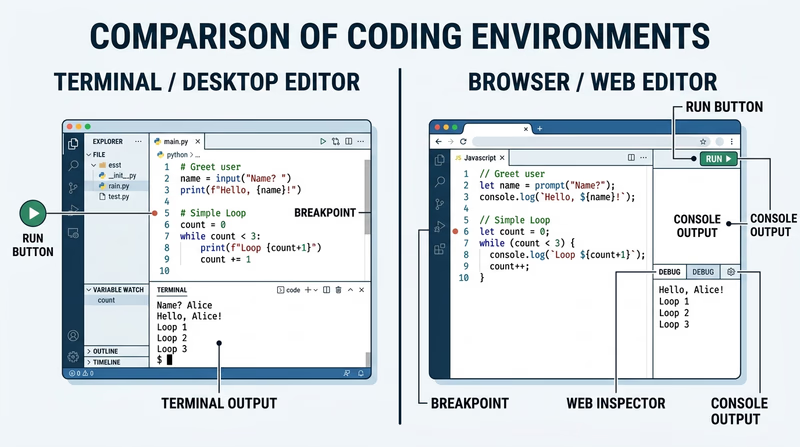
You now have one more project left. That last project is a good place to stretch your comfort zone and show how flexible programming skills can be.
Req 5c — Third Language Project
By the time you reach this third project, you are no longer just trying to prove that you can get a program to run. You are showing that the big ideas of programming transfer across tools. Input, decisions, computations, output, and debugging are still the core — even when the language or environment changes.
Stretch a little farther
A good third project often adds a new twist. Maybe your first project was text-based and your second was web-based. Your third could involve block coding, a simple game engine, physical computing, or a different style of interface. The point is not to make the most difficult project possible. The point is to show range.
Good third-project directions might include:
- a small game with score tracking and win/lose logic
- a sensor or button program in a physical-computing environment
- a web page that reacts to user input
- a useful tool that sorts, counts, or transforms data
Show what transfers between languages
This is a great place to notice that languages may look different, but the thinking often stays the same.
- variables still store information
- conditionals still guide decisions
- loops still repeat tasks
- debugging still depends on careful testing
If your counselor asks what you learned from using three languages, a strong answer might be: the syntax changed, but the problem-solving process stayed familiar.
What to compare across all three projects
Use this when you discuss the full set with your counselor- Which language felt most readable?
- Which development environment made debugging easiest?
- Which project gave the clearest output?
- Which language would you choose for another similar task?
- What programming ideas stayed the same across all three?
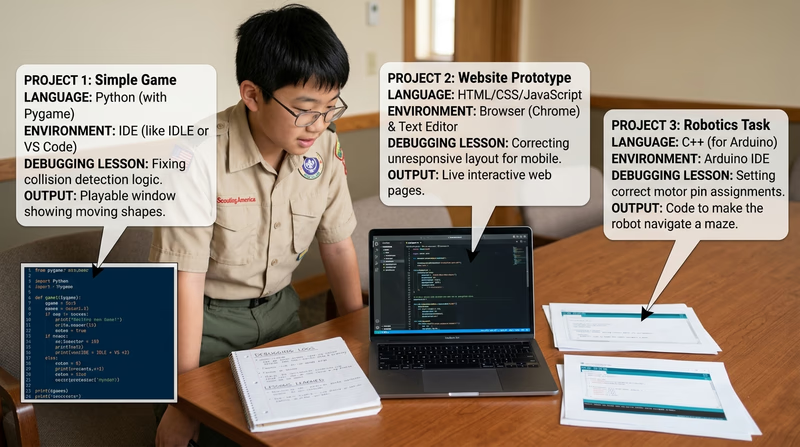
After three projects, you have done something real: you have written code in multiple contexts and learned how to talk about it clearly. The next requirement asks what you might do with that knowledge beyond the badge.
Req 6 — Careers or Coding for Life
You must choose exactly one option for this requirement. Both choices ask you to look beyond the badge, but they point in different directions:
- one path focuses on a career in programming or a related field
- the other focuses on using programming as a hobby or healthy long-term interest
Your Options
- Req 6a — Research a Programming Career: Investigate a real job in programming, including training, costs, duties, salary, and advancement. This option is best if you want to see what professional life in technology can look like.
- Req 6b — Build a Programming Hobby: Explore how programming skills can support a hobby, creative project, or healthy lifestyle goal. This option is best if you want to keep coding in your life even if you are not ready to think about a job yet.
How to Choose
| Factor | Req 6a — Career | Req 6b — Hobby or healthy lifestyle |
|---|---|---|
| Main focus | professional path | personal growth and enjoyment |
| Best for Scouts who want to… | learn what a real tech job involves | connect coding to a current interest |
| Research angle | education, salary, job duties, advancement | training, expenses, organizations, goals |
| What you gain | a clearer picture of the working world | a practical plan for keeping coding in your life |
Choosing the option that fits you
Think about where your curiosity is strongest right now- Pick Req 6a if you want to know what programmers, data analysts, cybersecurity specialists, game developers, or software engineers actually do for work.
- Pick Req 6b if you are excited about coding for robotics, game design, fitness tracking, digital art, automation, or another personal interest.
- Think about your next conversation: Which topic would give you more to say with your counselor?
- Choose the path with real evidence: Pick the option where you can gather stronger examples, notes, or interviews.
The next page starts with the career path. Even if you think you will choose the hobby option, it is still worth understanding what professional programming can look like.
Req 6a — Research a Programming Career
A programming career can mean far more than “someone who sits and types code all day.” Some professionals build apps, some test software, some automate factories, some protect systems, and some analyze huge amounts of data. This requirement asks you to zoom in on one path and understand what the real work looks like.
Good career choices to research
You might choose:
- software developer
- web developer
- game programmer
- mobile app developer
- data analyst or data scientist
- cybersecurity analyst
- embedded systems programmer
- robotics programmer
- quality assurance or test automation engineer
Pick a career that honestly interests you. It is easier to do strong research when you are curious about the answer.
What your counselor will want to hear
Your research should cover several areas clearly.
Training and education
Does the job usually require a college degree, certifications, a technical program, a boot camp, or a strong portfolio of projects? The answer may differ from one employer to another.
Costs
Training is never free. Think about tuition, tools, certification fees, travel, or the cost of building experience through classes and projects.
Job prospects
Are employers hiring for this role? Is the field growing, changing, or becoming more specialized? Good career research looks at where the job may be heading, not only where it has been.
Salary
Salaries can vary by location, skill level, and specialty. It is fine to report a range instead of a single number.
Job duties
What does a normal day actually include? Meetings, coding, testing, documenting, debugging, helping users, or working with a team?
Career advancement
What could come next after an entry-level role? Senior developer, technical lead, architect, project manager, product manager, or a specialist path?
Career research notes to gather
Bring evidence, not just guesses- Name of the career
- What the job does day to day
- Education or training commonly expected
- Approximate salary or salary range
- Outlook or growth of the field
- What sounds interesting to you personally
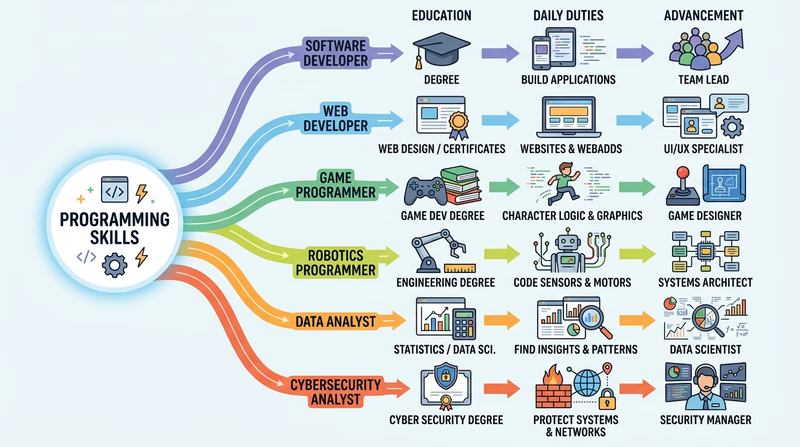
If the professional path sounds interesting, notice why. Is it the teamwork, the pay, the creativity, the problem solving, or the chance to build something useful? That personal reflection is part of the requirement too.
Req 6b — Build a Programming Hobby
Programming does not have to become your job to become an important part of your life. It can support hobbies, creative projects, outdoor activities, and personal goals. This option is about asking, “How could coding make something I already enjoy even better?”
Ways programming can connect to hobbies and healthy living
Here are a few strong directions:
Robotics and maker projects
Programming can power model rovers, small robots, lights, sensors, and inventions. If you like building with your hands, coding can become the part that makes your project respond and move.
Game design
If you enjoy games, programming can turn you from a player into a creator. You might build simple mechanics, scoring systems, menus, or interactive stories.
Fitness and tracking
Programming can help you log workouts, graph mile times, count steps, track cycling routes, or study patterns in sleep and exercise data. That connects coding to a healthy lifestyle in a direct way.
Digital art and music
Some people use code to create animations, generative art, sound experiments, or interactive media. This is a strong option if you enjoy creativity as much as problem solving.
Outdoor and practical tools
Programming can support navigation tools, camping checklists, weather dashboards, or gear-planning tools. Scouts often enjoy seeing code solve a real outdoor problem.
Research what it would take
For whichever hobby path you choose, think through three practical questions:
- Training needed — Would you need lessons, tutorials, club support, or a new language?
- Expenses — Would you need software, hardware, subscriptions, a microcontroller, or other tools?
- Organizations and support — Are there clubs, online communities, camps, makerspaces, or nonprofits that could help?
Goal-setting for a coding hobby
Bring both short-term and long-term thinking to your counselor discussion- Short-term goal: Something you could start this month, such as finishing a small game, building a step tracker, or trying a coding club.
- Skill goal: One specific thing you want to improve, such as debugging, web design, or controlling hardware.
- Long-term goal: Something larger, such as making a full app, joining a robotics team, or contributing to a project with others.
- Support plan: List the people, spaces, or organizations that could help you keep going.
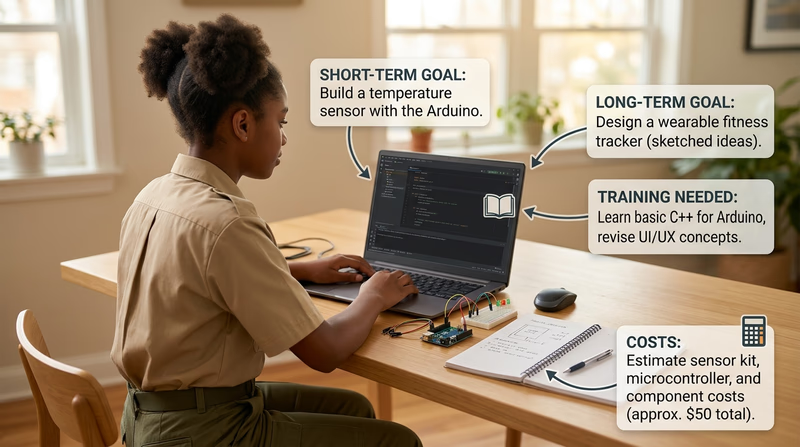
Whether you choose the career path or the hobby path, this requirement is about looking forward. Programming is not just a badge topic. It is a skill you can keep using in many parts of life.
Extended Learning
Congratulations
You have worked through programming as history, daily technology, safe practice, software rights, and hands-on projects. That already puts you ahead of many people who use software every day without ever thinking about how it is built.
The exciting part is that programming keeps opening new doors. You can use it to solve practical problems, make creative projects, understand data, and work with people who think in very different ways.
Debugging as a Life Skill
Debugging is more than fixing code. It is a way of thinking.
When programmers debug, they do not usually solve a problem by guessing wildly. They observe what happened, compare that to what should have happened, change one variable, test again, and learn from the result. That same approach works in many other places — science projects, gear planning, robotics, electronics, and even everyday decision making.
A Scout who learns debugging well becomes calmer when something breaks. Instead of saying, “It failed, so I quit,” they ask, “What is the smallest useful thing I can test next?”
How Programmers Work Together
Many people imagine programming as a lonely activity. In real projects, teamwork matters a lot. Programmers often work with designers, testers, writers, teachers, engineers, scientists, or customers. That means communication matters almost as much as syntax.
Good programmers explain ideas clearly, ask good questions, write notes another person can follow, and accept feedback without taking it personally. They also learn how to read code written by someone else, which is a very different skill from writing fresh code on your own.
Skills that matter beyond coding
- breaking a big problem into smaller pieces
- naming things clearly
- testing before making claims
- listening when users describe a problem
- improving a project without starting over every time
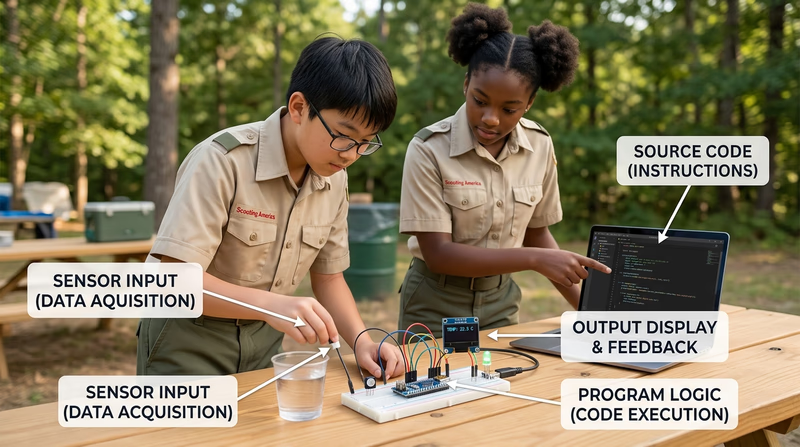
Programming in the Physical World
Some of the most exciting programming happens when code leaves the screen and affects real objects. Sensors can measure temperature, movement, light, or moisture. Microcontrollers can turn on motors, blink lights, trigger alarms, and collect data outdoors.
That opens the door to projects connected to Scouting life, such as a campsite weather display, a gear checklist app, a simple trail-condition dashboard, or a hydration reminder system.
Real-World Experiences
Programming experiences worth trying
Each one helps you keep learning after the badge- Visit a makerspace: Many communities have public makerspaces where you can try robotics, 3D printing, electronics, and coding tools.
- Join a robotics or coding club: Working with a team teaches collaboration and project planning, not just syntax.
- Build a useful family or troop tool: A packing checker, menu calculator, or event sign-up helper turns coding into service.
- Attend a hackathon or coding workshop: Beginner-friendly events help you see how programmers solve problems together.
- Explore open-source projects: Reading real code written by other people helps you grow quickly.