Req 1 — Digital Safety and Coding Health
Programming looks safe because most of the work happens at a desk, but coders still need real safety habits. This requirement covers two big areas:
- Digital safety — how to protect yourself, your information, and your reputation online
- Coding health — how to prevent the strain and fatigue that can come from long sessions at a screen
Requirement 1a
A strong programmer is not just someone who can write code. It is also someone who knows how to behave wisely in digital spaces. When you learn online, share code, join forums, or collaborate on projects, you leave a digital trail. That trail can help you build trust — or create problems if you move too fast.
Personal Safety Awareness "Digital Safety" video Open this official Scouting America page first so you can watch the Digital Safety training without hunting for it later on the page. Link: Personal Safety Awareness "Digital Safety" video — https://www.scouting.org/training/youth-protection/scouts-bsa/What digital safety means for programmers
Programmers often sign up for websites, save projects in the cloud, download tools, and ask questions in online communities. That creates a few extra responsibilities:
- protect accounts with strong passwords and, when possible, multi-factor authentication
- think before sharing your real name, school, location, or schedule
- download software only from trusted sources
- treat online comments, chat rooms, and shared code spaces like public places
- remember that copying someone else’s work without permission is not only dishonest, it can also expose you to unsafe files or bad advice
Digital safety habits for a young programmer
Use these before you click, post, or download
- Stop and verify the source: If a link, file, or message seems rushed, strange, or too good to be true, check it with a trusted adult.
- Use strong account protection: A long password or passphrase is better than a short clever one.
- Keep personal details private: Share only what is needed for the project.
- Ask before joining platforms: Some coding sites have social features, messaging, or public profiles.
- Read the rules: Community guidelines tell you what behavior is expected and what information should stay private.
Questions to bring to your counselor
After watching the video, be ready to discuss questions like these:
- What kinds of information should stay private online?
- What would you do if a stranger asked to move a conversation off a safe platform?
- How can you tell whether a site or download is trustworthy?
- Why is it smart to involve a parent or guardian before joining a new online coding community?
Requirement 1b
The most common programming injuries do not come from explosions or sparks. They come from repetition, posture, and long stretches of intense focus. A sore wrist, tight shoulders, dry eyes, or a headache can turn a fun project into a miserable one.
Repetitive stress injuries
A repetitive stress injury happens when the same motion is repeated so often that muscles, tendons, or nerves become irritated. For programmers, that usually means a lot of typing, mousing, tapping, or holding the same position for too long.
Common warning signs include:
- aching or burning in your fingers, wrist, forearm, shoulder, or neck
- tingling or numbness
- reduced grip strength
- pain that gets worse during or after a coding session
First aid for repetitive stress
The first step is to stop the activity that is causing the pain. Rest the area. Gently stretch if that does not make it worse. Switching hands, changing your chair height, or moving your keyboard and mouse can also help reduce stress on the same muscles.
🎬 Video: Treating Repetitive Stress (video) — https://www.youtube.com/shorts/1yp0jOyARCk
Eyestrain
Eyestrain happens when your eyes work hard for a long time without enough breaks. Staring at a screen can make you blink less, which dries your eyes and makes them tired.
Signs of eyestrain include:
- dry, itchy, or watery eyes
- blurry vision
- headaches
- trouble focusing after long screen time
- feeling extra tired even if the project itself is going well
First aid and prevention for eyestrain
The simplest prevention habit is the 20-20-20 rule: every 20 minutes, look at something about 20 feet away for 20 seconds. That gives your eye muscles a short reset.
Other helpful habits include:
- sit far enough from the screen that you are not leaning in all the time
- raise or lower the monitor so you are not craning your neck
- reduce glare from bright windows or overhead lights
- increase text size instead of squinting
- blink on purpose during long work sessions
🎬 Video: Treating Eye Strain (video) — https://www.youtube.com/watch?v=j3ff4aeItl0
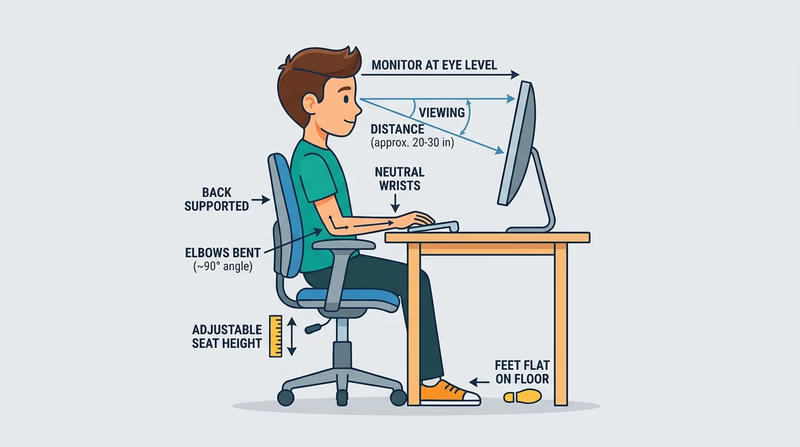
Before you move on, make sure you can explain both prevention and first aid. Your counselor is not just looking for vocabulary. They want to hear that you know how to code safely over time.