Req 5b — Second Language Project
Your second project is your chance to compare. After building one program already, you now know the badge is not only about getting code to run. It is about noticing how different languages and development environments solve similar problems in different ways.
What should be different this time?
If your first project used a typed language in a browser, maybe your second one should use a desktop editor. If your first project produced text output, maybe your second should create a visual response, a game action, or a device behavior. The idea is to make a meaningful comparison.
Things that can differ between projects include:
- how you write syntax
- how variables and data types are handled
- what tools help you debug
- how the program takes input
- what the output looks like
🎬 Video: Programming Merit Badge Welcome! From AutomationDirect (video) — https://www.youtube.com/watch?v=s07aEbPwThM
Compare the workflow, not just the code
Suppose you write one project in Python and another in JavaScript. The important insight is not only that the words look different. It is that the whole workflow may change. One environment may run instantly from the command line, while another shows the results in a browser. One may highlight errors before you run the code. Another may make it easier to inspect variables while the program is running.
Questions to ask during your second project
These will help you compare languages intelligently
- What was easier in this language than in the first one?
- What was harder or more confusing?
- How did the development environment help you spot bugs?
- Did input, output, or testing feel different?
- Would you choose this language again for the same kind of problem?
Demonstrate growth
Your counselor will likely notice whether the second project shows more confidence than the first. That could mean:
- testing more than one example input
- explaining your logic more clearly
- fixing a bug more quickly
- organizing the code into easier-to-read parts
The program does not need to be huge. It just needs to show that you are getting better at thinking like a programmer.
GitHub Docs — Hello World GitHub's beginner documentation is useful if your second environment involves saving code, tracking changes, or sharing work online. Link: GitHub Docs — Hello World — https://docs.github.com/en/get-started/start-your-journey/hello-world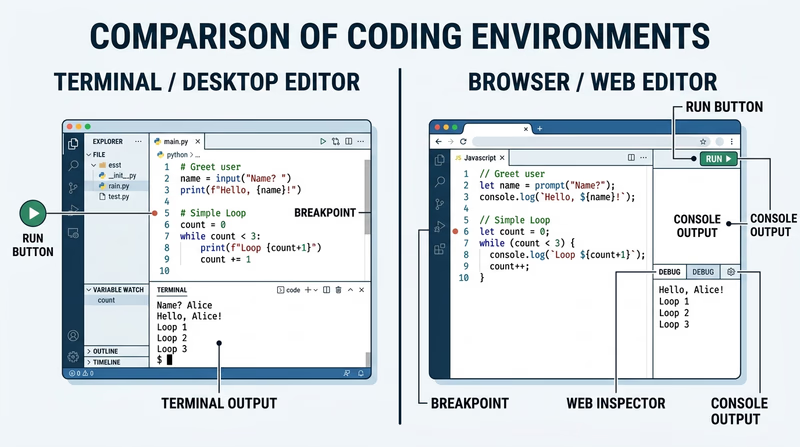
You now have one more project left. That last project is a good place to stretch your comfort zone and show how flexible programming skills can be.