Req 7 — Smart Online Safety
Online safety is real-world safety. A stolen password can drain money. A fake message can steal an account. A shared photo can damage trust, reputation, and mental health. This requirement uses an inherited-action structure because each topic asks you to discuss how a different kind of digital risk works and how to lower it.
Requirement 7a
How online crimes usually start
Most online crimes do not begin with a movie-style hacker attack. They start with a trick: a fake message, a fake login page, a fake giveaway, or pressure to click fast before you think.
Habits that reduce your chances of becoming a victim
- use strong, unique passwords or passkeys
- turn on two-factor authentication where possible
- do not click links just because the message feels urgent
- log in through the real app or bookmarked site instead of message links
- share less personal information publicly
- update devices and apps so known security holes get patched
Official Resources
Protect Your Personal Information From Hackers and Scammers (website) FTC guidance on passwords, personal information, device security, and scam prevention. Link: Protect Your Personal Information From Hackers and Scammers (website) — https://consumer.ftc.gov/protect-your-personal-information-hackers-scammers#keep🎬 Video: Passkeys Explained in Under 4 Minutes (video) — https://youtu.be/bdp8RdjV6PU?si=MPYq7d0la_3KVSuX
Requirement 7b
Scams usually target emotion first
Financial scams often work by making you excited, scared, embarrassed, or rushed. Once emotion takes over, people stop checking details.
Common examples
- fake online stores with prices that seem too good to be true
- payment app scams using fake screenshots or overpayment tricks
- fake charities after disasters
- fake job offers asking for upfront fees or banking information
- romance or friendship scams that slowly lead to money requests
How to spot them earlier
Slow down. Check the sender, website address, reviews, and whether the payment method has buyer protection. Real businesses do not need panic to make a sale.
Official Resources
🎬 Video: Common Online Scams (video) — https://youtu.be/k8UVnkh8i0c
🎬 Video: 10 Common Internet Scams (video) — https://youtu.be/CDhAOvsyw2s?si=42nASL5CjtBBKwru
Requirement 7c
Build layers instead of trusting one tool
Effective online security is not one magic app. It is a stack of habits:
- secure passwords or passkeys
- two-factor authentication
- software updates
- account recovery options you still control
- careful privacy settings
- skepticism toward suspicious links and files
Think of accounts like doorways
Your email account is especially important because it can reset many other accounts. Protecting email well protects the rest of your digital life too.
A strong online security baseline
Simple habits that protect most people from common attacks
- Protect the main account: Secure your email first.
- Add a second layer: Use two-factor authentication or passkeys.
- Patch known problems: Install updates on phones, computers, and apps.
- Review what you share: Lock down privacy settings and remove unused apps with access to your accounts.
Official Resources
🎬 Video: Effective Online Security (video) — https://youtu.be/aO858HyFbKI
Requirement 7d
What identity theft is
Identity theft happens when someone uses your personal information to pretend to be you. That might mean opening accounts, making purchases, filing false claims, or taking over an existing account.
How to prevent it
- protect login credentials
- be careful with birth dates, addresses, and school details you share publicly
- do not hand out Social Security numbers or other sensitive information unless the source is verified and the reason is real
- watch for surprise password reset emails, bills, or account alerts
Official Resources
🎬 Video: Preventing Identity Theft (video) — https://youtu.be/kDFeSUUwRnA?si=ncAfMQF1RIdIWetC
Requirement 7e
Why social media gives criminals an advantage
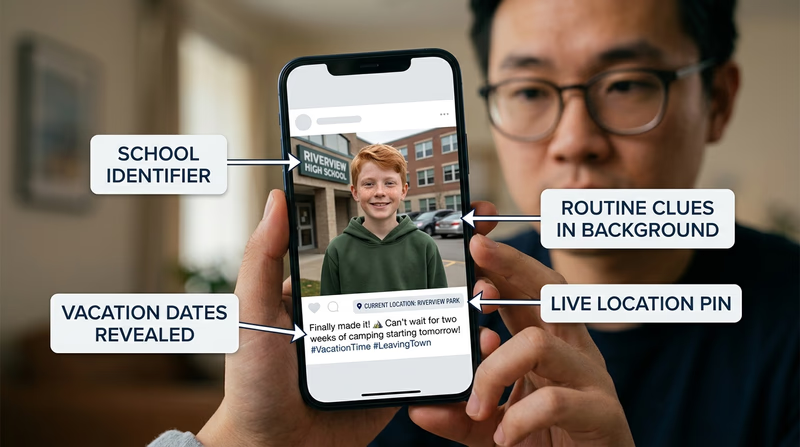
Social media reveals routines, interests, friend groups, schools, locations, and emotional pressure points. That information can help criminals pretend to know you, guess security questions, or choose the best time to scam or approach you.
Safer social media habits
- avoid posting live location details when possible
- think twice before posting schedules or travel plans
- keep friend and follower lists tighter
- be careful with quizzes and trends that collect personal details
- remember that public photos can show addresses, uniforms, or license plates in the background
Official Resources
🎬 Video: How Criminals Use Social Media (video) — https://youtu.be/5bdBvNCBeho?si=bJdF2LM50LG_tm74
Requirement 7f
When online behavior crosses the line
Not every mean message is automatically a crime, but some digital behavior can become criminal depending on what is shared, how often it happens, and whether threats, harassment, coercion, or exploitation are involved.
Examples of risky behavior
- repeated threatening or harassing messages
- sharing private photos without permission
- pressuring someone to send explicit images
- impersonating someone to humiliate or harm them
- using texts or group chats to coordinate harassment or threats
Why this matters
A message sent in ten seconds can have legal, school, and personal consequences that last much longer. Digital evidence also sticks around. Screenshots, cloud backups, and forwarded images make “I deleted it” a weak defense.
Online safety is really about pattern recognition: urgency, secrecy, oversharing, weak boundaries, and false trust. Next, you will use the same kind of practical thinking while moving through cities, vehicles, stations, and airports.